Tachograph analysis for transport companies
All the tachograph files of your drivers and your fleet in one place, automatically checked against the European driving and rest times, the Dutch Working Hours Decree for Transport (Arbeidstijdenbesluit vervoer) and the Mobility Package. You see what is wrong, what it could cost and what still needs to be done.
One week free, with your own files. You get a demo of the portal with the DDD files from your own tachographs and driver cards. It lasts one week and is free of charge.
The tachograph records everything, but a DDD file cannot be read as it is. The VYS Tacho analysis portal reads the files from the driver cards and the vehicle units, sets them against the law and turns them into overviews per driver, per vehicle and per period. Seventy-two features, from today's driving time to the Driver CPC training hours and the return of your tractor units to the Netherlands.
How the files come in
Automatically, via the app in the cab
The VYS Tacho app talks directly to the smart tachograph via Bluetooth and retrieves the driver card and the vehicle unit. No FMS box, no dongle, nothing to install. The company card stays in a card reader at the office.
Upload them yourself in the portal
If you already have files from a download key or another system, you drag them into the portal. They are read, their signature is checked and they are linked to the right driver.
Email them as an attachment
Send them from a known company email address to ddd@vystacho.nl. They come in as if you had uploaded them.
Directly from your download provider
If you already download via another provider or a telematics system, we can set up a link with it through that provider's API. The files then come in automatically, without anyone having to transfer them. We store your login details encrypted and they are only used to retrieve the files.
Via FTP or an API from your own server
If the files are on your own server or in your own system, we set up an FTP link or an API link. That way the portal fits in with the way you already work, and nothing needs to change in how the files are retrieved.
BeMaMiToe: showing that you as an employer did everything you could
If an employed driver breaks the driving and rest time rules, in the Netherlands the employer is regarded as the offender. The only way out is to show that you gave the necessary orders, took the necessary measures, provided the necessary means and exercised supervision. Together this is called BeMaMiToe, and it is all about proof: what has not been recorded does not count.
BeOrders
Clear instructions and rules that the driver demonstrably knows.
- Your own company standards, stricter than the law, recorded and monitored per driver.
- Infringement letters in the driver's language, with the infringement and the article; the driver sees and signs them in the app, with the time recorded.
MaMeasures
Stepping in when things go wrong, and preventing it from happening again.
- All infringements per driver, with severity, ERRU points and fine indication, so you can see where you need to step in.
- Every week on one page: who is suddenly committing many infringements, which cards and calibrations are expiring and which downloads are missing.
MiMeans
The driver has what he needs to comply with the rules.
- The VYS Tacho app downloads the driver card and the vehicle unit automatically via Bluetooth, without installing anything.
- The Tacho analyse driver app shows the driver his own infringements, with an explanation, amount and ERRU points.
ToeSupervision
Checking regularly, and being able to show that you did.
- Every card and vehicle download checked against the driving and rest times, and per driver and vehicle you can see who has not been downloaded for too long.
- Follow-up: per driver, his infringements next to what he did to learn from them, right down to how long he read his analysis.
How the company is doing, at a glance
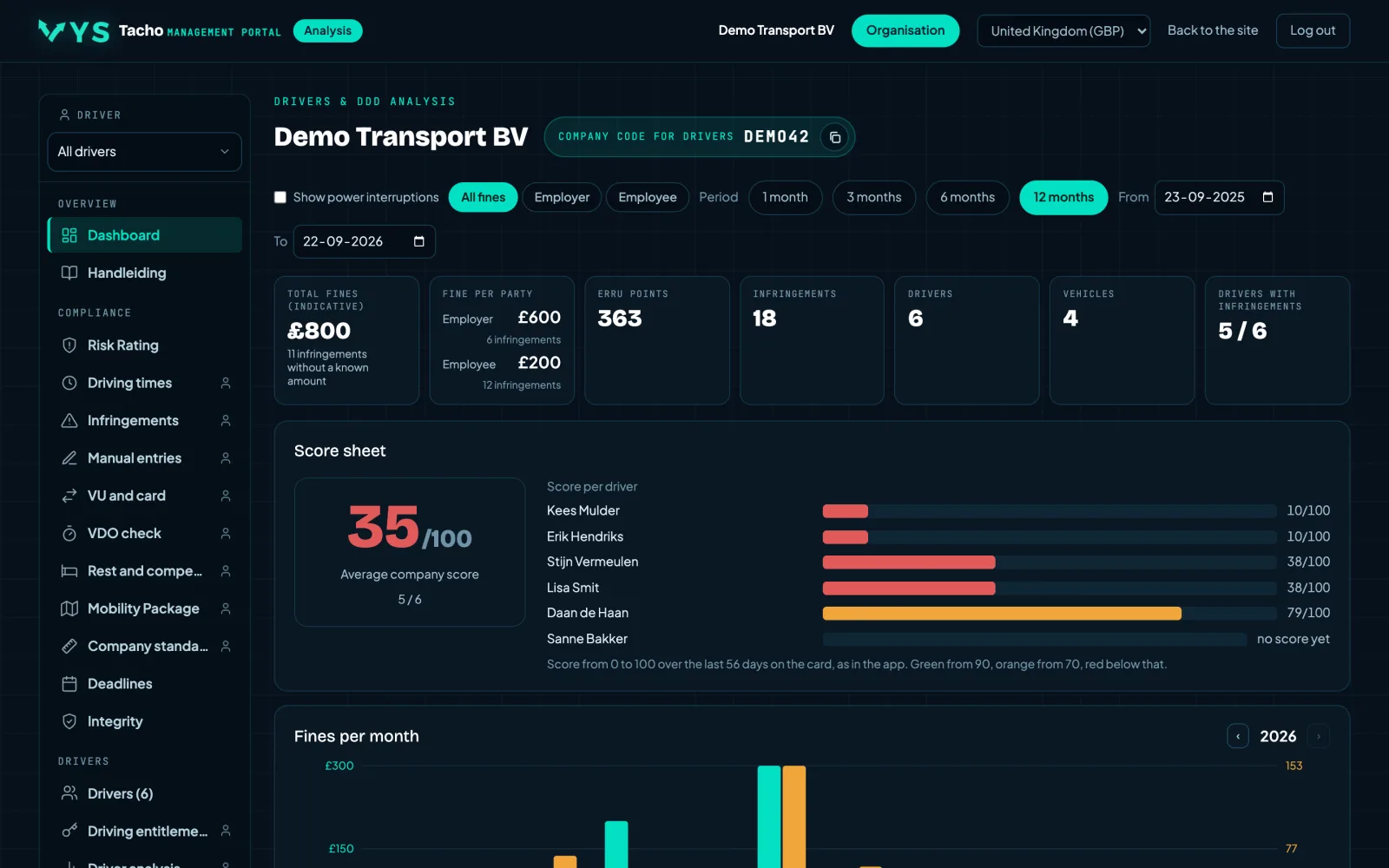
The dashboard adds up the infringements of the whole company and shows the fine indication alongside, split between employer and employee. It also shows the ten drivers with the most infringements and the trend over the past months, so you can see whether things are getting better or worse.
- The total fine indication over a period of your choice, split by who pays it.
- ERRU points and a score from 0 to 100 per driver over the last fifty-six days.
- Click on a driver and you go straight to his analysis.
- A chart showing the trend, so you judge the direction rather than a single figure.
- Tiles with the ERRU score per vehicle and the ILT penalty points against the threshold; one click takes you to the explanation on Risk Rating.
- Long lists collapse after ten rows, so the overview stays an overview.
The fine amounts are an indication based on the published rates of the selected country. It is not an imposed fine and not a prediction of what an inspector will do.
The past week and the coming week on one page
Everything that needs attention this week, together: drivers who suddenly score much higher fines than usual, deadlines that have passed or will pass within seven days, and the notable events of the past seven days such as days without a download, driving without a card and unknown cards.
- Notable drivers: a most serious infringement this week, or a fine far above their own average of the eight weeks before.
- Downloads, cards, calibrations, company cards and documents that have expired or expire this week.
- Every row is clickable and takes you to the page where you can act on it.
This page brings together what the other pages already know and does not calculate anything new itself. What is missing here because nothing was downloaded, you see under Integrity.
Risk classification: where you stand and where you are heading
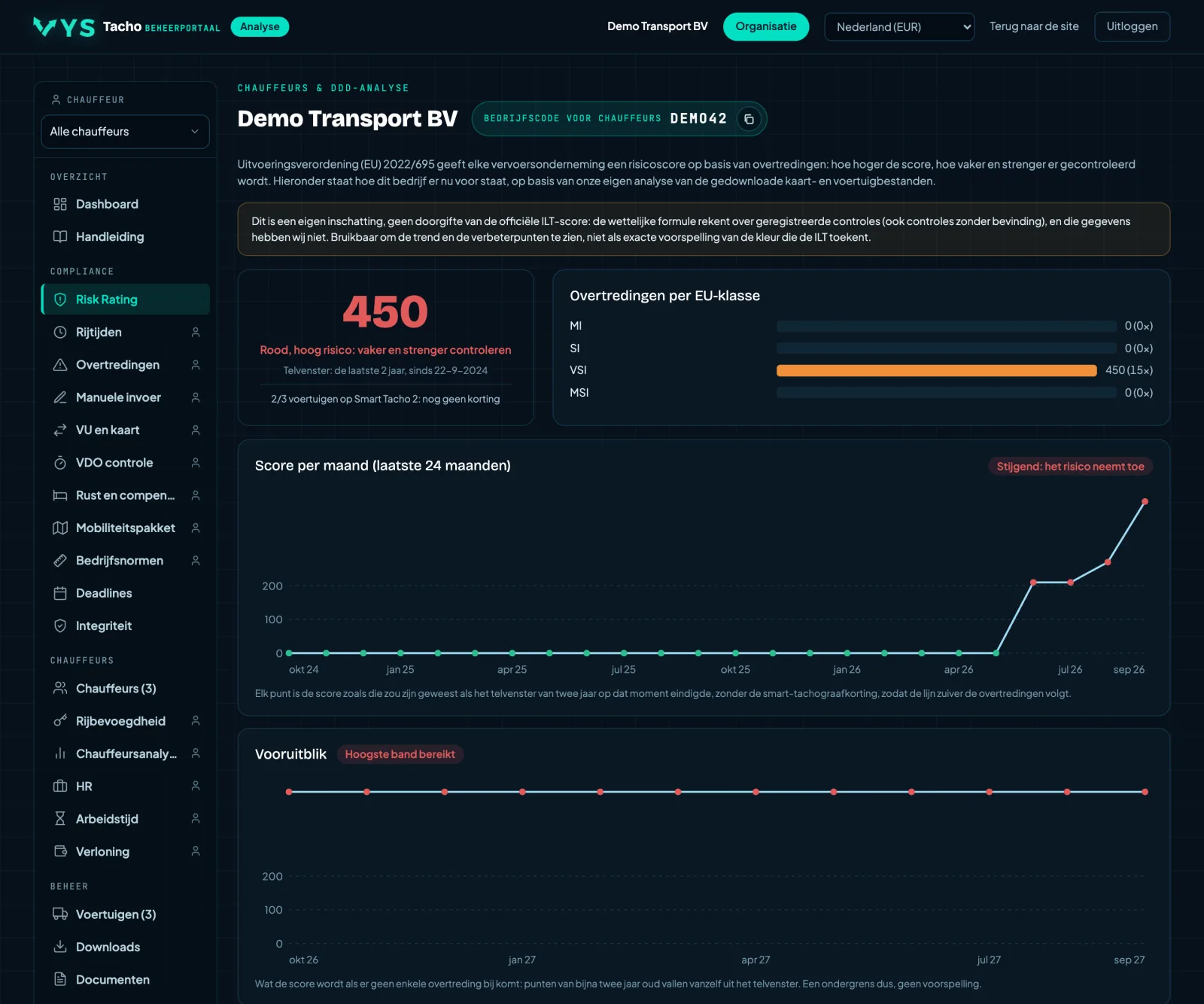
A risk score for the company in the spirit of the EU risk rating system, calculated from the infringements we find in your files. The EU formula divides the points by the number of vehicles, and the portal does the same: a larger fleet may have more points before it becomes a problem. With key figures, the trend over the months, the breakdown by type of infringement and a twelve-month outlook.
- The colour is based on the points per vehicle: up to and including 100 green, up to and including 200 orange, above that red.
- Key figures side by side: total points, per vehicle, average per driver, the number of infringements, vehicles and drivers.
- The band you fall into, with how many more points are allowed before the next colour starts.
- An outlook: what the score will be if no further infringements are added and the old points expire.
- Separately per depot, with the points per driver, so that a large depot does not automatically look the worst.
- Expandable per type of infringement, so you can see what weighs most heavily.
This is our own calculation based on your downloaded files. It is NOT the official score of the ILT or any other authority: they also include roadside checks and company inspections, and we do not have that data. The outlook is a lower limit and not a prediction.
The ILT penalty points, separate from the EU score
A separate tab next to the EU risk classification. The same infringements, counted the way the ILT does: 9 points for an MSI, 3 for a VSI and 1 for an SI, over two years, against the threshold that goes with the number of certified true copies of your Community licence (Eurovergunning).
- Where you stand relative to the notification (half) and the threshold.
- Penalty points per month and an outlook: what remains if nothing more is added.
- The drivers with the most penalty points, and the table of thresholds from the policy rule.
- You set the number of certified true copies yourself on the Organisation page; without a setting, the portal uses the number of vehicles.
- Also as a tile on the dashboard, in the colour of the status.
Our own estimate: the ILT only counts final sanctions, we count every infringement in the files. The actual number is therefore usually lower.
Who can still drive today
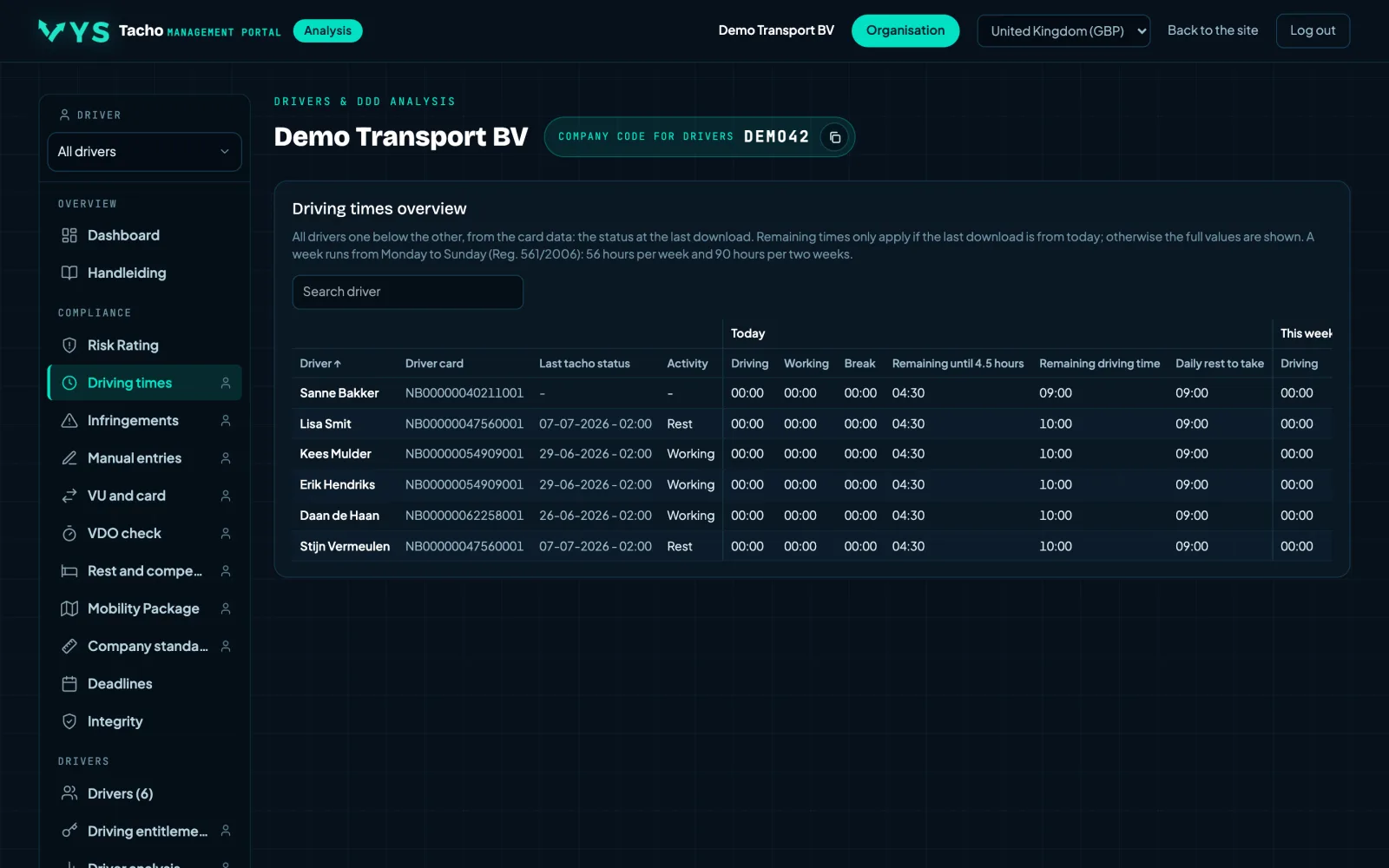
All drivers listed with what they have driven, worked and taken as breaks today, this week and last week. Alongside that, the time remaining until the four and a half hours are used up, the driving time still left this week and the daily rest that still has to be taken.
- Driving, working and breaks side by side, per day and per week.
- The remaining driving time calculated from the last known status of the card.
- Intended for planning, not just for assessing afterwards.
The status is as fresh as the last download or the last reading from the app. If a driver has an old date next to his name, his remaining driving time is no longer correct.
Every infringement, with severity, points and amount
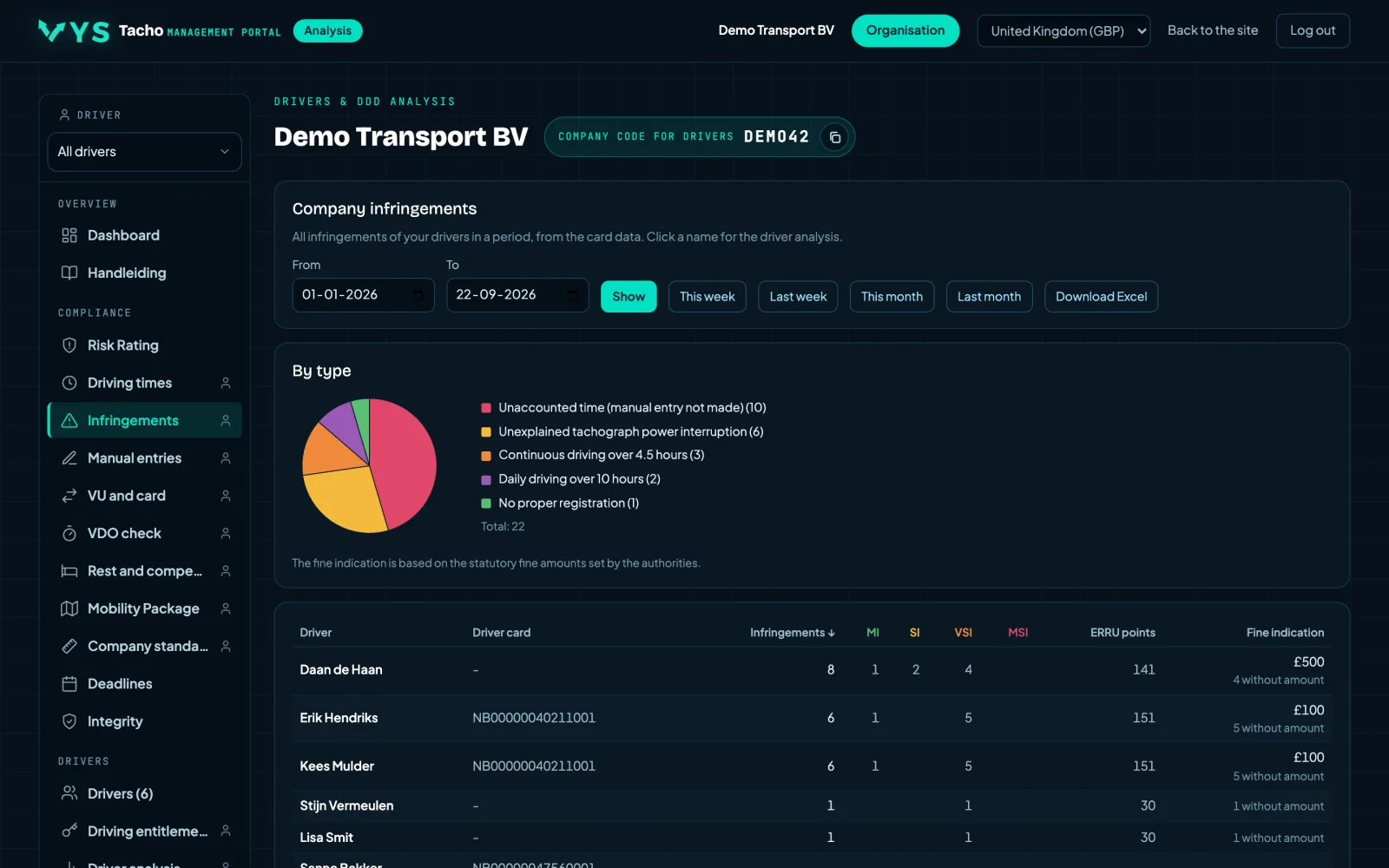
The infringements of the whole company over a period: by type in a chart and per driver in a table with the number, the severity according to the European classification, the ERRU points and the fine indication of the selected country.
- The classes MI, SI, VSI and MSI, as an enforcement officer also uses them.
- Sort by points or by amount, so you can see where there is most to gain.
- Export to Excel to go through it with someone who has no access to the portal.
- For each infringement an explanation in plain language, with the legal article.
Tachograph operating errors, shown separately
A driver can comply perfectly with the driving and rest times and still be fined because he operated the tachograph incorrectly. The portal groups these errors under Tachograph operation, so you see them separately from the driving time infringements and can explain them in a targeted way.
- Manual entries that are missing or incomplete, with the start country and the end country.
- Card changes during double-crew driving where the card was not set to work before or after.
- Border crossings from the vehicle unit that are not on the card.
- Driving off too soon after inserting the card, so the entry is lost.
- The recording of loading and unloading on a smart tachograph version 2: a separate Loading and unloading tab shows every operation from the card and vehicle unit with time and GPS position on Google Maps, the day's timeline shows them at their moment, and Mobility and Cabotage and posting use them in their calculations.
An operating error is often not deliberate: the driver sees a confirmation on the screen and thinks it went fine. That is exactly why it pays to show them per driver.
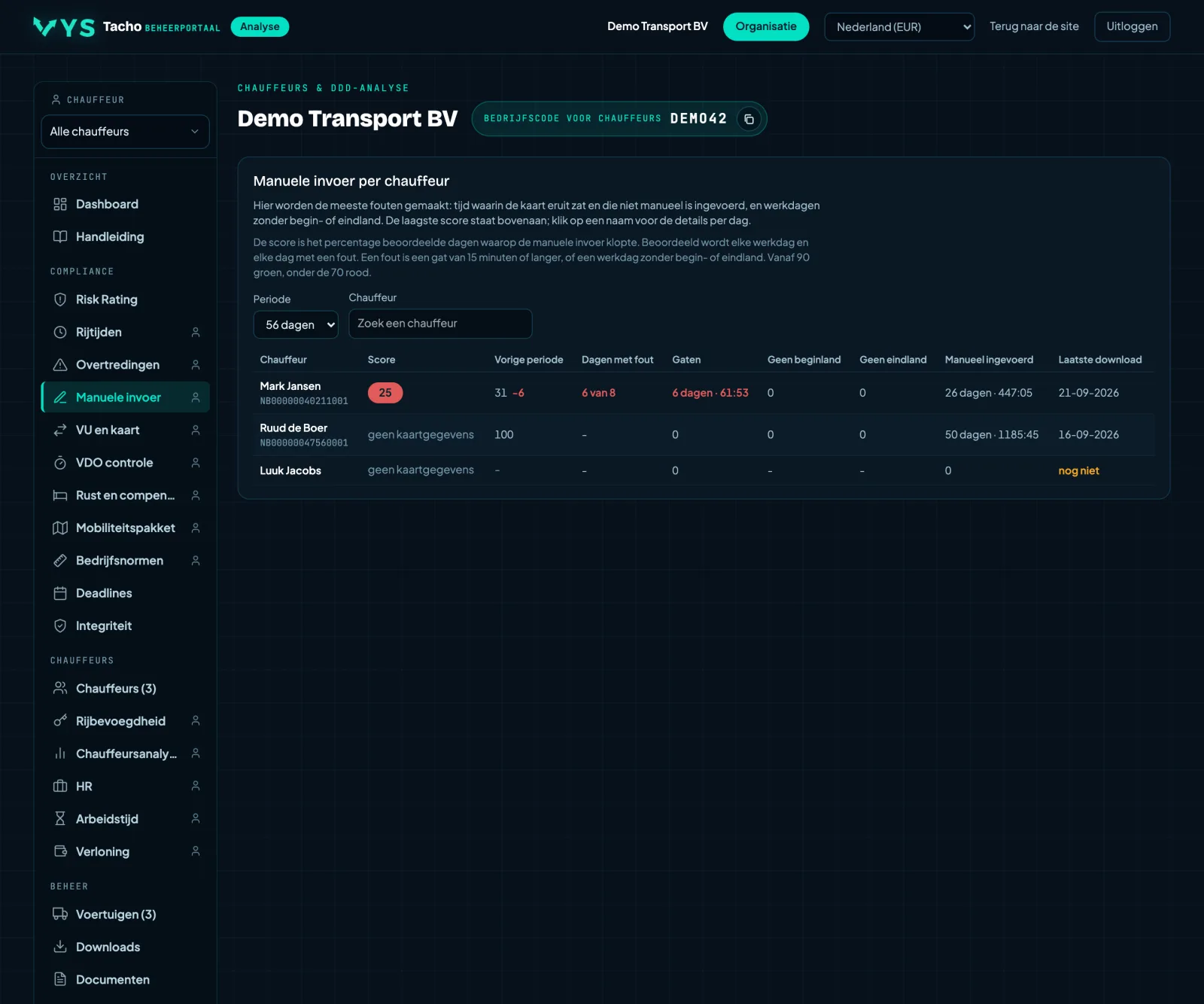
Manual entry: where most errors are made
A score per driver for how neatly he makes the manual entries: the hours between withdrawing and reinserting the card, with the start country and the end country. The overview shows the lowest score at the top, because that is where there is most to correct.
- Per day you can see what was missing, not just a total.
- Start country and end country checked separately; they are also required if the driver has only had rest.
- A missing entry stands out immediately during a check: there is then a gap between two journeys and nobody can show what happened.
Card change during double-crew driving: always on work
A tab under Tachograph operation. During a card change with a double crew, the card must be set to work for at least one minute before and one minute after. If the slot was set to rest, availability or driving before or after, enforcement officers can fine this as incorrect use of the mode switches (card change during double-crew driving). Per driver, how many changes there were and how often the slot was not set to work before or after.
- For each occurrence the time, the slot, how long the card was out, how long there was no work after insertion, and the vehicle.
- With the fine of the selected country, and the Dutch offence code.
- Preventing it is simple: always change on work, and set the slot to work before withdrawing and before inserting, for the co-driver too.
- Every incorrect change also appears in the driver analysis, with a police cap on the timeline at the moment of the change and a click for the explanation.
Border crossings that are not on the card
A tab under Tachograph operation. A Smart Tacho 2 records every border crossing. On a VDO with an older driver card, the driver has to enter the country after the border himself; a Stoneridge adds it itself. The portal compares the border crossings from the vehicle unit with the card and shows per driver which are missing or were entered with a different country.
- For each border crossing, from which country to which country, and in which vehicle.
- With who should have put it on the card: the driver or the tachograph itself.
- Vehicles with an older tachograph do not record border crossings; there is nothing to compare there.
OUT: who and when
A tab under Tachograph operation. Every time a driver switched out of scope (OUT) on and off again, from the card and the vehicle unit, with how much driving was done while it was on. That driving counts as other work, not as driving time.
- For each occurrence the driver, the registration number, switched on, switched off, the duration and the time driven.
- Only the occurrences with driving, or totalled per driver.
Ferry/train: who, when and was it correct
A tab under Tachograph operation. Every time a driver switched ferry/train on and off again, from the card and the vehicle unit. The portal assesses the rest around the crossing according to Art. 9(1): at most two interruptions, together at most one hour, and only with a regular daily rest or a reduced weekly rest.
- For each crossing the driver, the registration number, switched on, switched off and the duration.
- The rest, the interruptions and the verdict: correct, too short, interrupted too often or too long, or no rest.
- On a Stoneridge, also whether the end of the duty before switching on and the start after the crossing were recorded.
- Only the deviations, or totalled per driver.
Loading and unloading, with the location
A tab under Tachograph operation. A Smart Tacho 2 records every loading and unloading operation with time, GPS position and odometer reading, on the driver card and in the vehicle unit. The portal puts them from both sources into one list, with an operation that appears in both shown as one row.
- For each operation loading, unloading or loading and unloading, the driver, the registration number and the odometer reading.
- The recorded position with a link to Google Maps, and whether Galileo authenticated that position.
- Totalled per driver and per vehicle, with the last operation and where it took place.
- The day timeline of the driver and the vehicle shows the same moments, just like out of scope and ferry or train as a band from start to end.
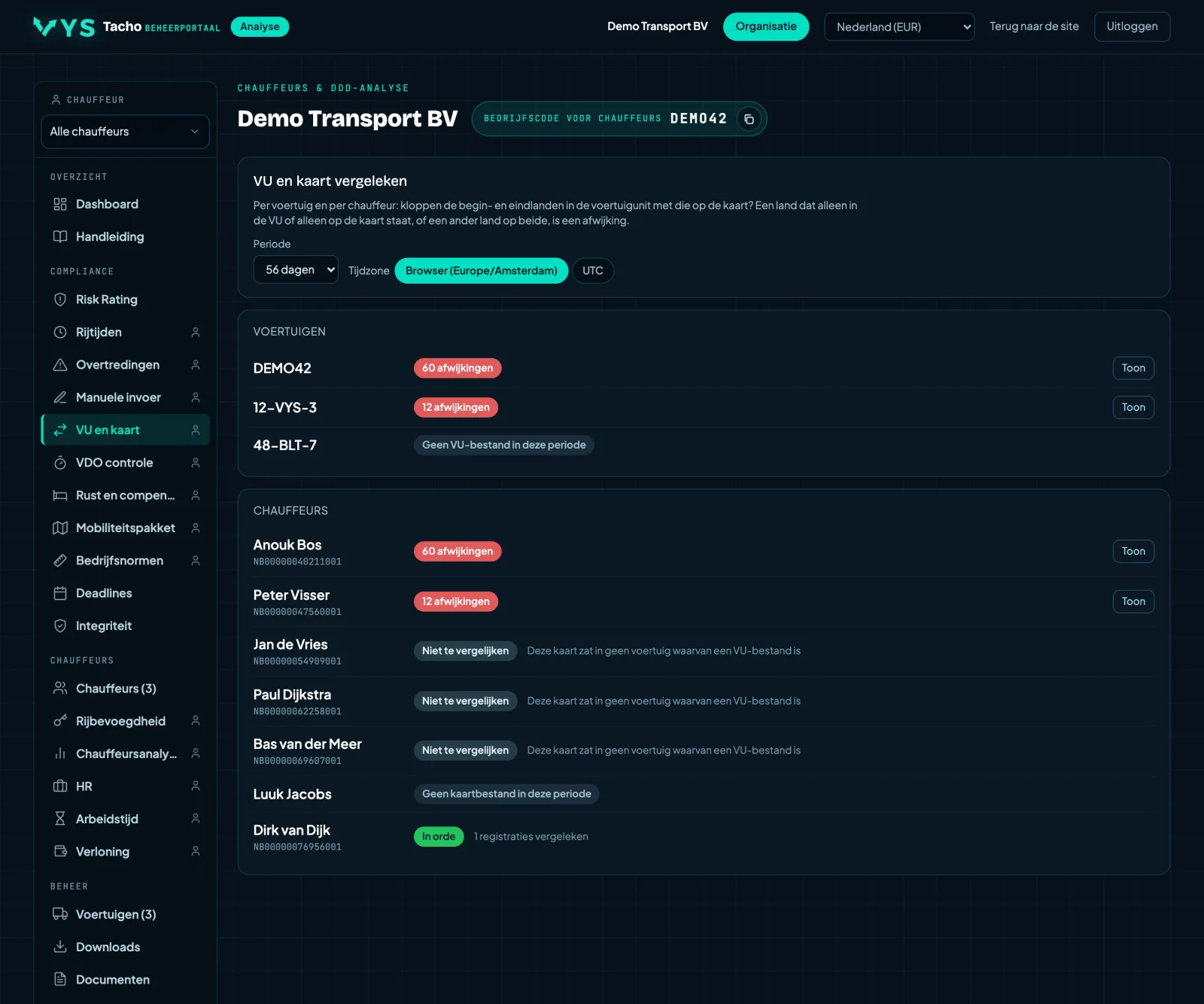
The vehicle unit next to the driver card
The tachograph in the vehicle records everything, and so does the driver's card. The two should say the same thing. The portal puts them side by side and gives a status per vehicle and per driver, with the deviations expandable underneath.
- If it says "OK", the two sources have really been compared and they match.
- Deviations can be expanded per row, so you can see where the difference lies.
- Unknown cards in your own vehicles come to light here.
- For each deviation, which cards were in the tachograph at that moment, and in which slot.
- An exclamation mark with an explanation if the card has an authentication record at that moment but lacks the place record with the country: the country was entered, but the card did not store it.
A comparison is only possible if BOTH files are present. If the VU download or the card download for that period is missing, there is no verdict, and that is not an approval.
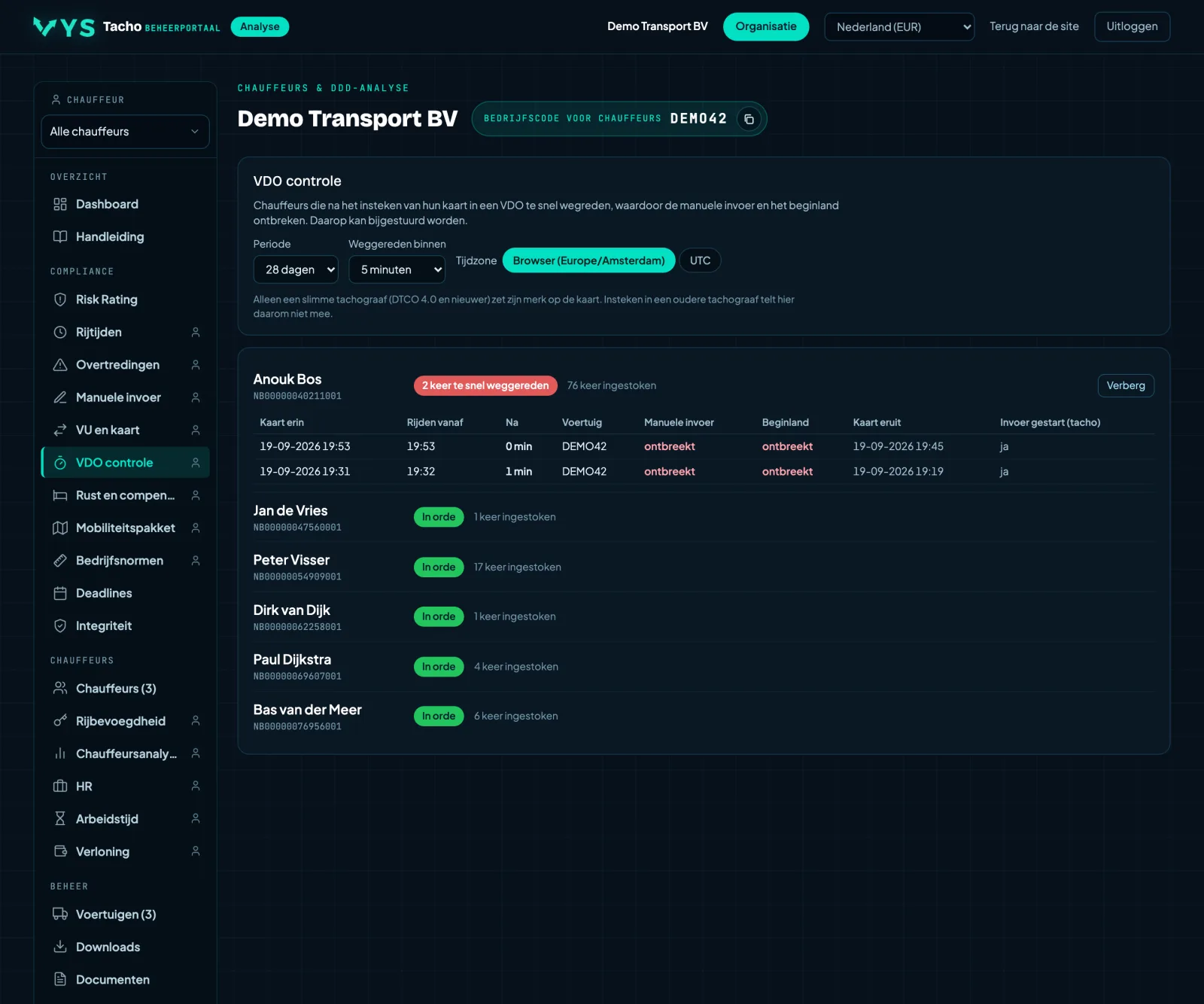
Driving off too soon after inserting the card
If a driver drives off before the tachograph has completed his manual entry, the device does not record the entry or the start country. The driver's screen does show a confirmation, so he thinks it went fine. The portal finds these cases.
- For each case, when the card was inserted and when driving started.
- Intended to explain to the driver that he must wait a moment after inserting the card.
- The consequence is twofold: the entry is lost and the start country is missing.
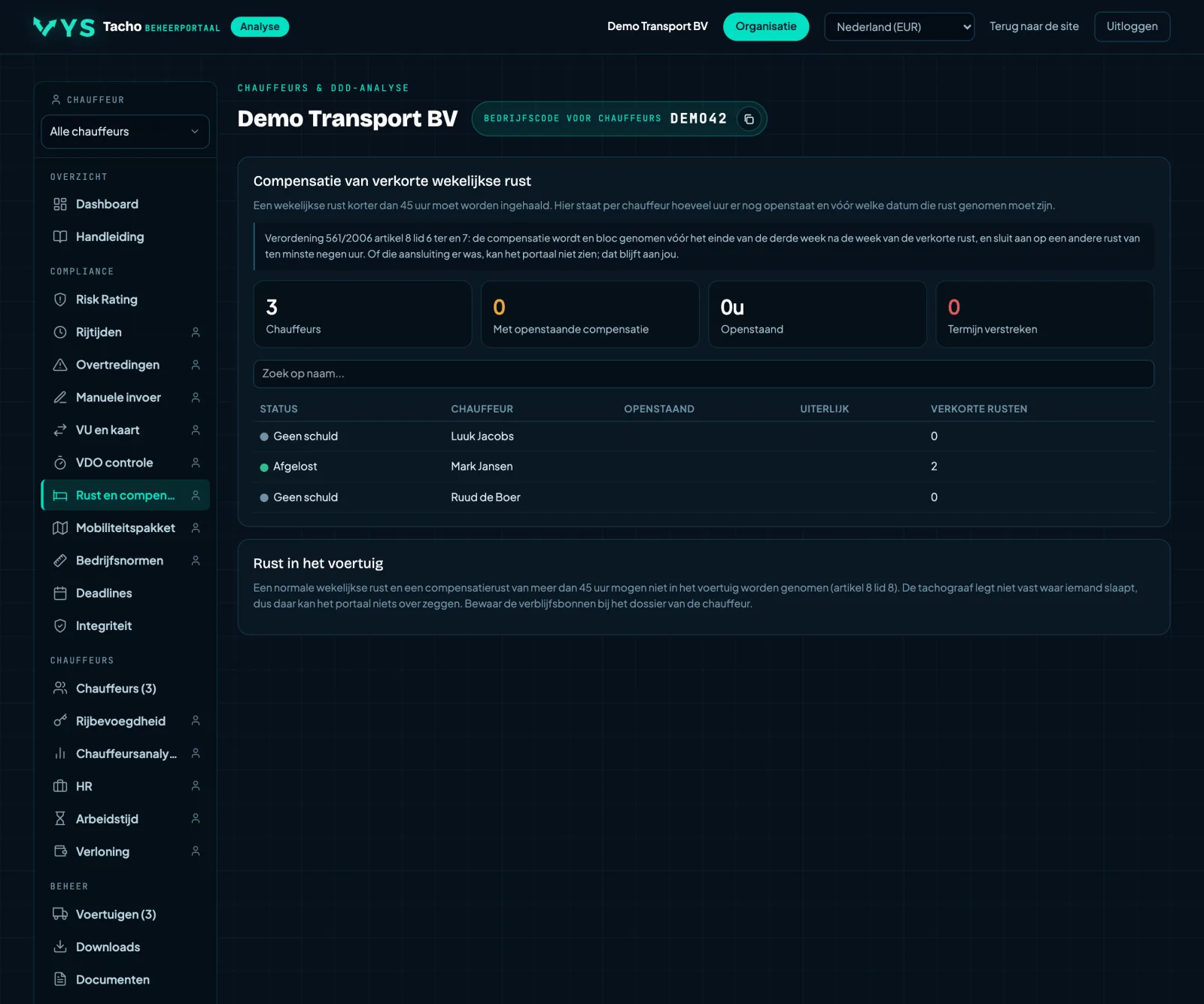
Compensation for reduced weekly rest, with the deadline
If a driver takes a reduced weekly rest, the missing part must be made up later en bloc. The portal calculates per driver how many hours are outstanding and by which date that rest must have been taken: the end of the third week following the week of the reduced rest.
- Per driver the outstanding hours, with the Deadline column.
- Expandable: which rest caused the debt and which later rest paid it off.
- Paid off too late stays marked as too late, so it does not quietly disappear.
Compensation that falls AFTER the deadline no longer pays off the debt. The law also requires the compensation to be attached to another rest of at least nine hours, and the portal cannot see whether that was the case. Where someone sleeps is not recorded by the tachograph at all.
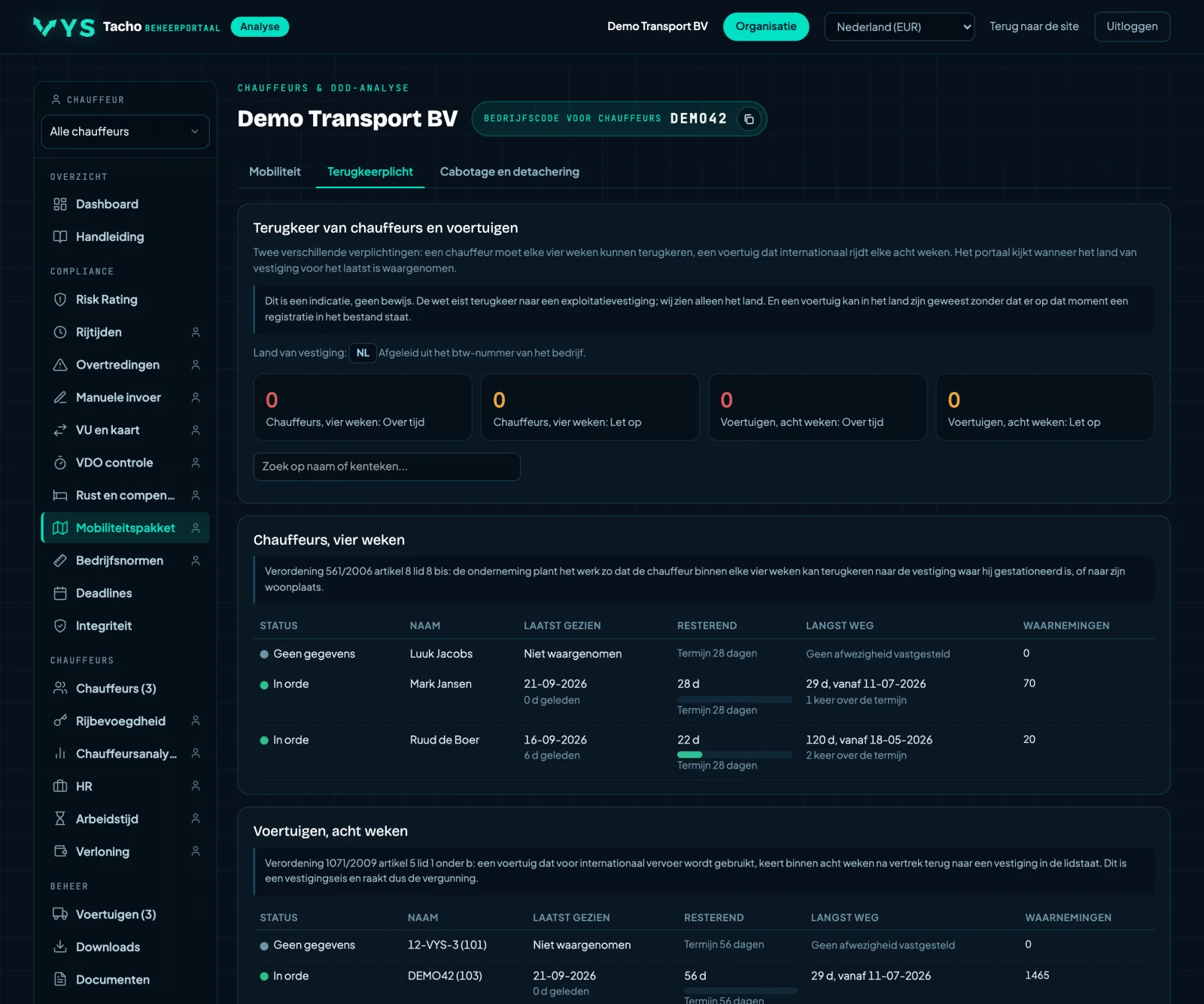
Return obligation: two deadlines you should not mix up
The driver must be given the opportunity to go home or to the operating centre every four weeks, and the vehicle must return to an operational centre every eight weeks. These are two different obligations from two different regulations. The portal tracks them separately, based on the country records in the files.
- Drivers with four weeks at the top, vehicles with eight weeks below.
- A bar that fills up as the deadline approaches, orange from three quarters.
- No country data in the files means No data, and not silently approved.
This is an indication and not proof. The law requires a return to an operational centre and we only see the country. The obligation for the vehicle comes from the establishment requirement and therefore affects the licence, not just a fine.
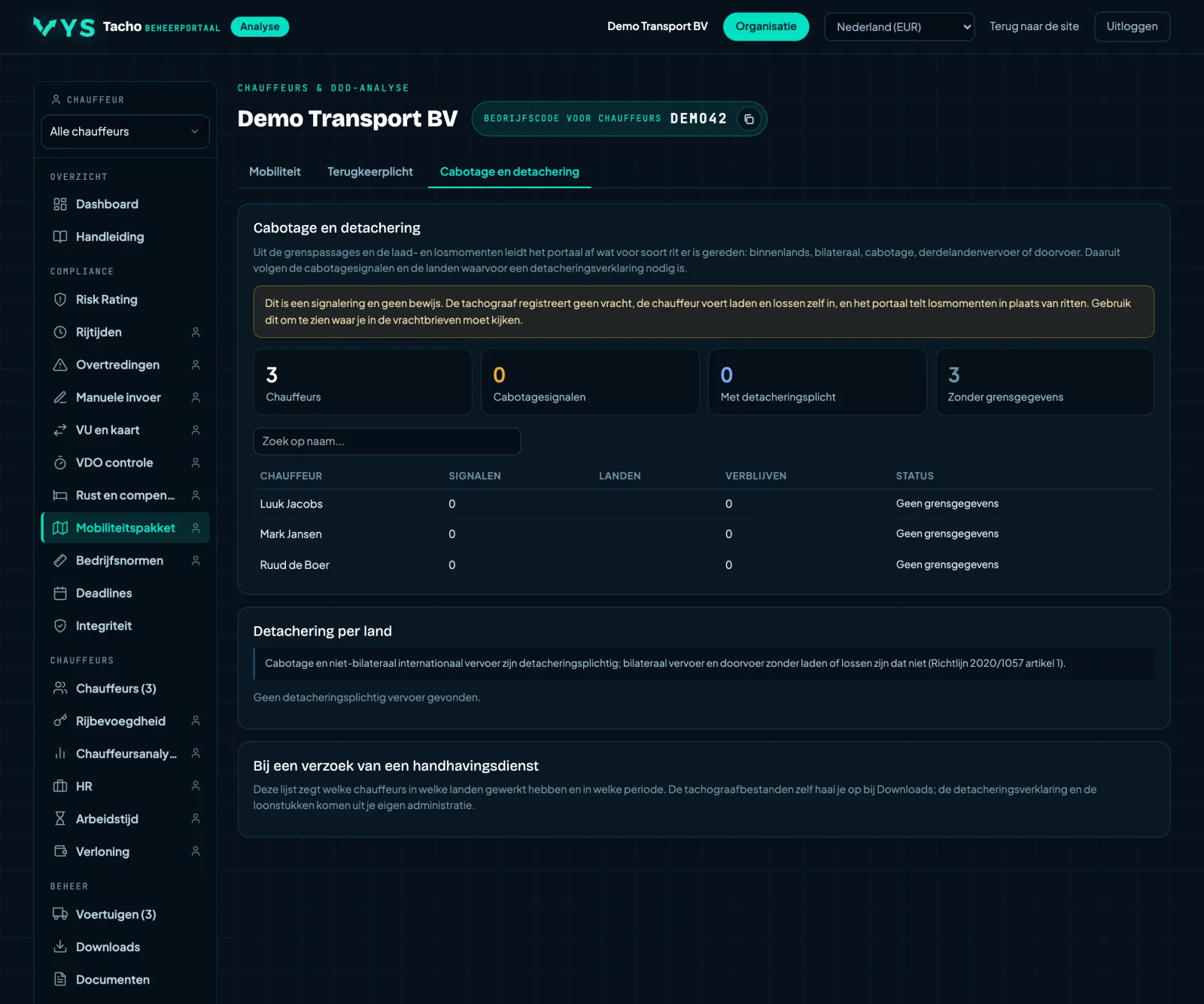
Cabotage and posting, flagged from the journeys themselves
From the border crossings and the loading and unloading moments, the portal works out per country what kind of journey was driven: domestic, bilateral, cabotage, cross-trade or transit. From this follow the cabotage signals and the countries for which a posting declaration is required.
- Per driver the stays per country with the number of loading and unloading moments.
- The cabotage rules alongside: at most three operations in seven days, and the cooling-off period of four days.
- A Posting block per country, for when an enforcement authority requests data.
This is a signal and not a conclusion. The tachograph does not record freight, the driver enters loading and unloading himself, and the portal counts unloading moments rather than journeys. A card from before the second-generation smart tachograph contains no border crossings at all.
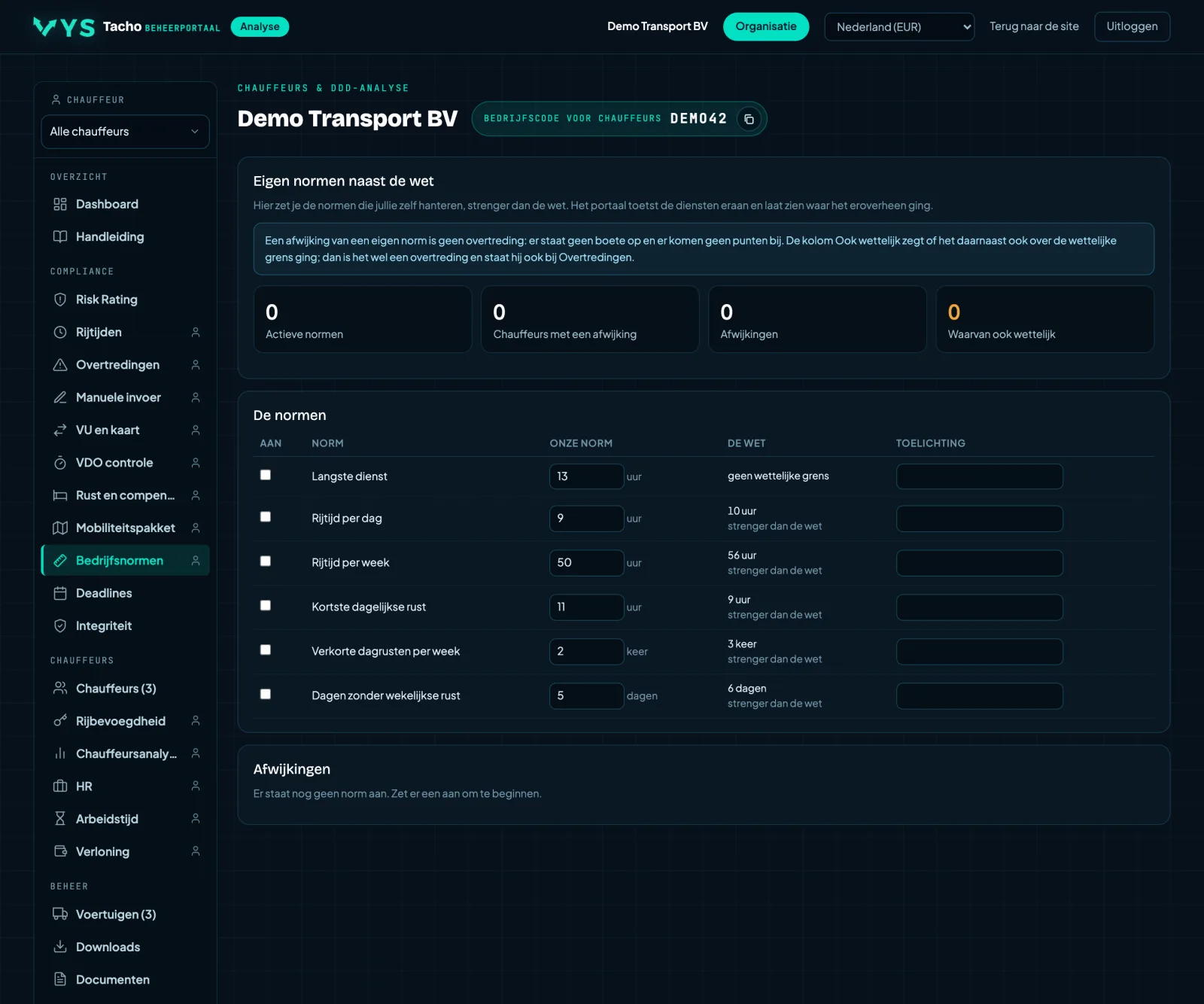
Your own standards, stricter than the law
Many companies do not want to drive right up to the legal limit. Switch on your own standards and fill in your own limit; the portal monitors them alongside the law and shows per driver where the duties went over.
- Six standards, each of which can be switched on or off separately, with the legal limit next to it for comparison.
- Expandable per driver to the deviations per day.
- Deviations that also exceeded the legal limit are marked separately.
A deviation from your own standard is NOT an infringement: there is no fine and no points are added. Only the rows marked Also legal also appear under Infringements.
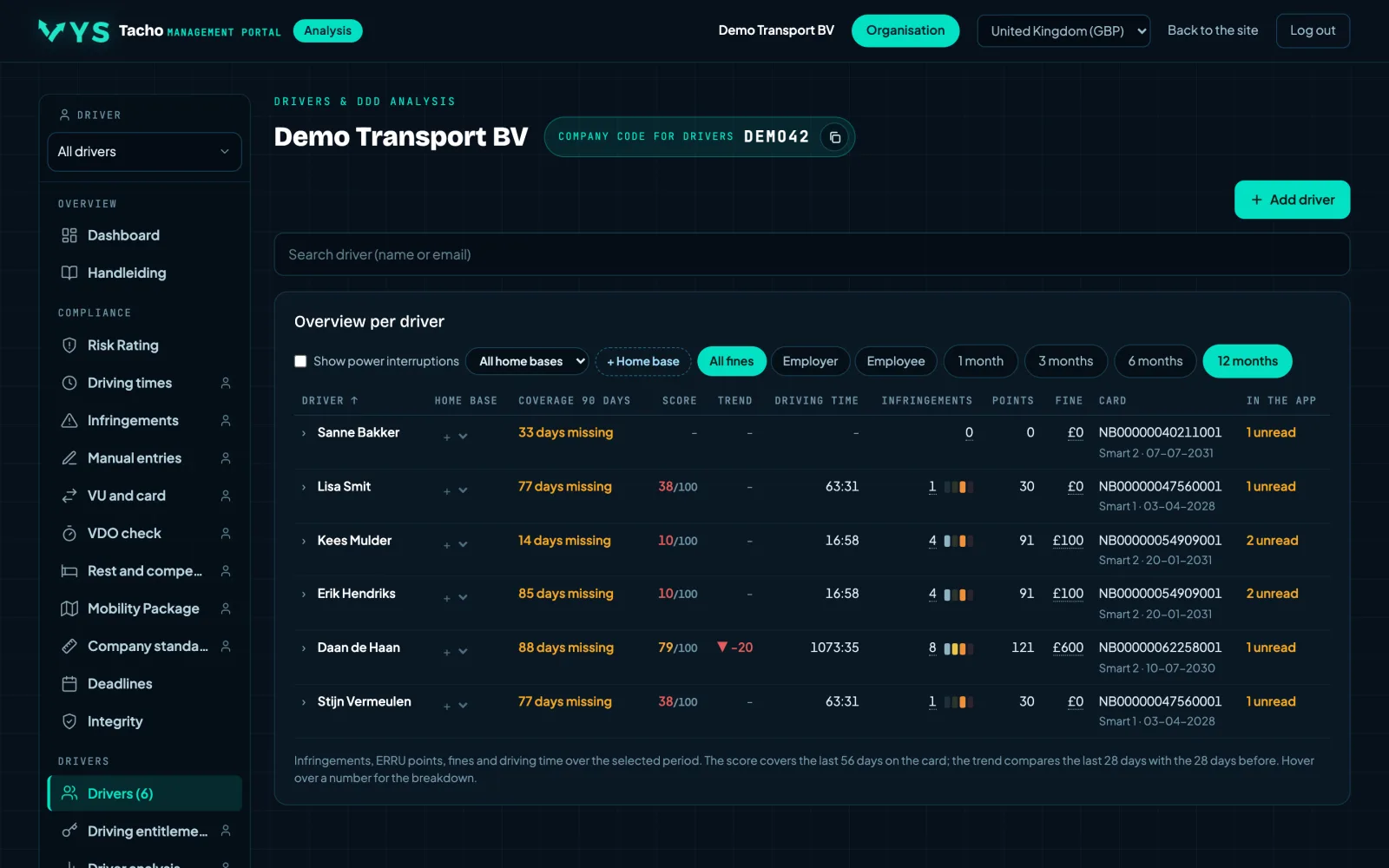
The list, with score, points and trend
All drivers with their score, their ERRU points, the number of infringements and the direction things are going. Plus the card number, the card generation, the expiry date, how many days of card data are missing and whether the driver has read his analysis in the app.
- Search by first name, surname, staff number or card number, in any order.
- Selecting a driver immediately filters all pages where that makes sense.
- Hired drivers can be marked separately, with the party they come from.
- On request, we link the portal to your HR system. A new driver is then created automatically, so the analysis and your personnel records always stay in step.
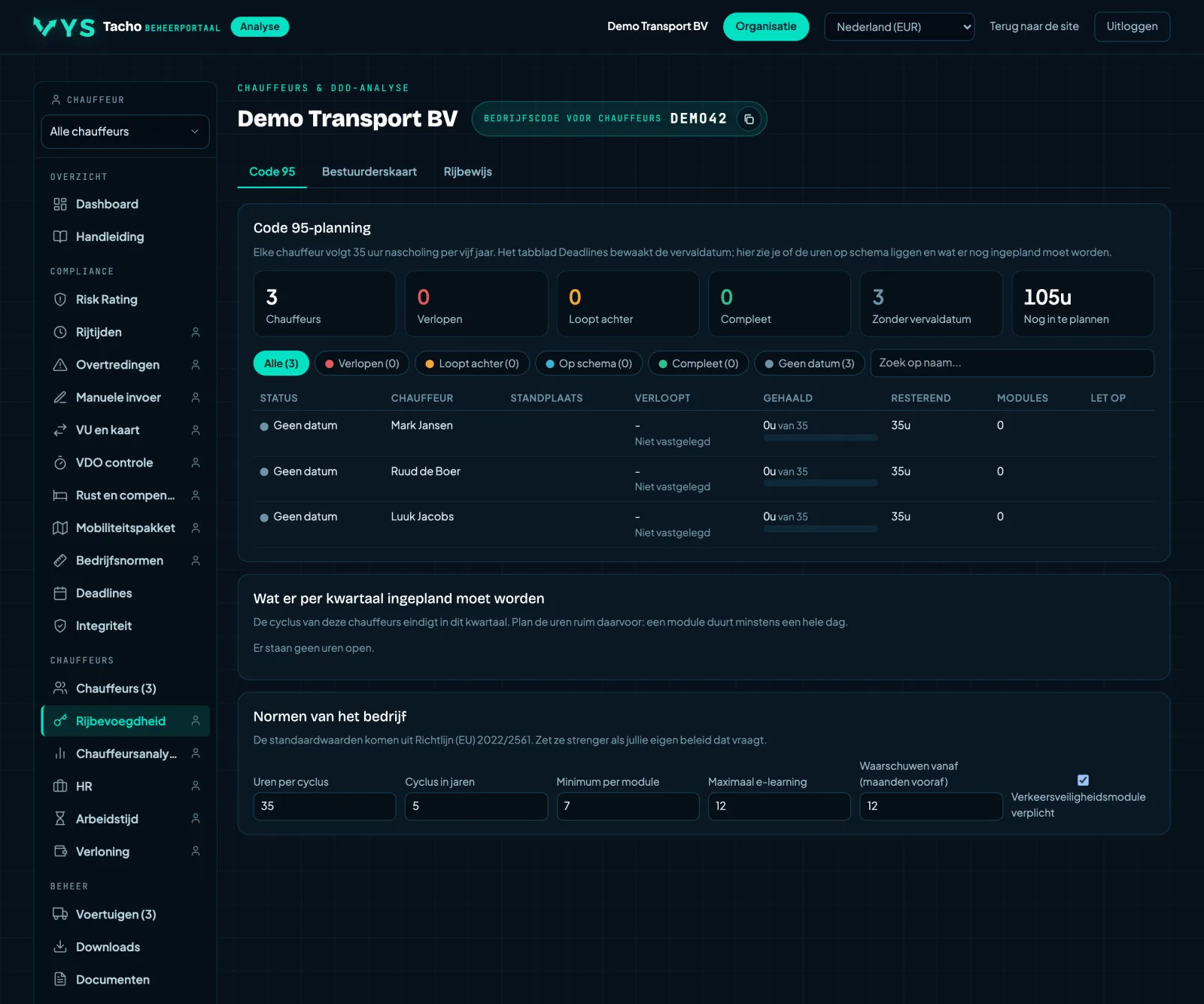
Driver CPC: thirty-five hours, and who is going to fall behind
Per driver, how many of the thirty-five hours of periodic training have been completed within the current five-year cycle, and how many hours per quarter need to be scheduled to make it. For each course attended, you add a module with date, hours, training centre and certificate.
- A marker in the bar shows what should have been completed by now, in proportion to the elapsed part of the cycle.
- The road safety topic and e-learning are monitored separately: at least one safety module, at most twelve hours of e-learning.
- A quarterly plan with the number of hours that still need to be booked.
- The expiry date comes from Deadlines; if it is not there, the portal says so instead of calculating with an assumption.
Thirty-five hours is not enough if there is no road safety module or if it includes more than twelve hours of e-learning. The status then stays at on schedule and not at complete.
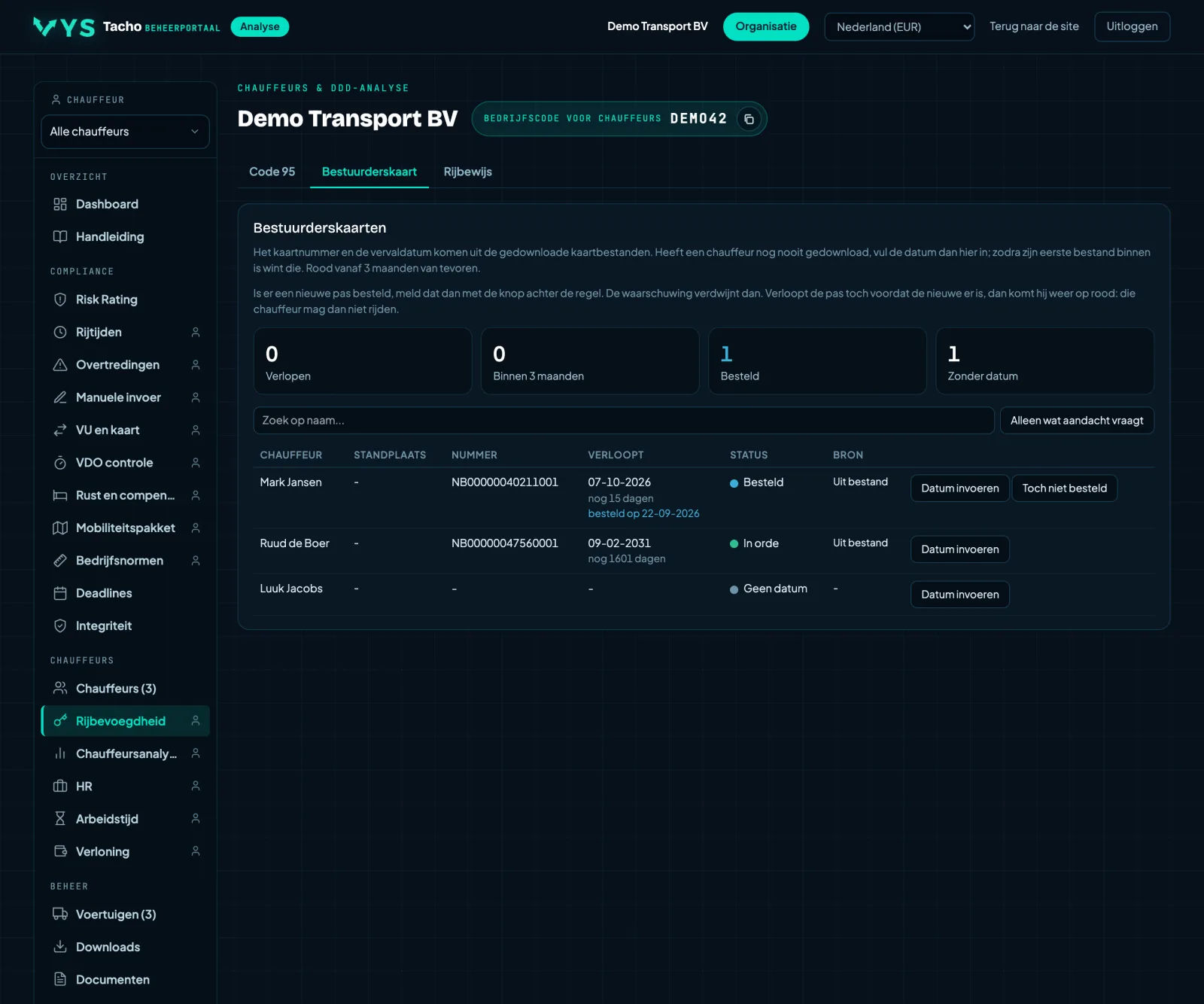
Which driver card is expiring soon
Per driver the card number and the expiry date of the driver card, taken directly from the downloaded card files. If there is more than one card in someone's name, the portal shows the card that is valid the longest, because that is the one he drives with.
- Number and date come from the card files; you do not need to do anything for that.
- If a driver has never downloaded, you enter the date yourself. As soon as his first file comes in, that file takes precedence.
- The next expiry date is at the top, with anything already expired above it.
- If a new card has been ordered, you report this with the New card ordered button; the row turns blue with the order date underneath.
Ordered silences the warning for a card that is expiring soon, but a card that has actually expired turns red again, even with that note on it. At that point the driver must not drive, and the fact that a replacement is on its way does not change that.
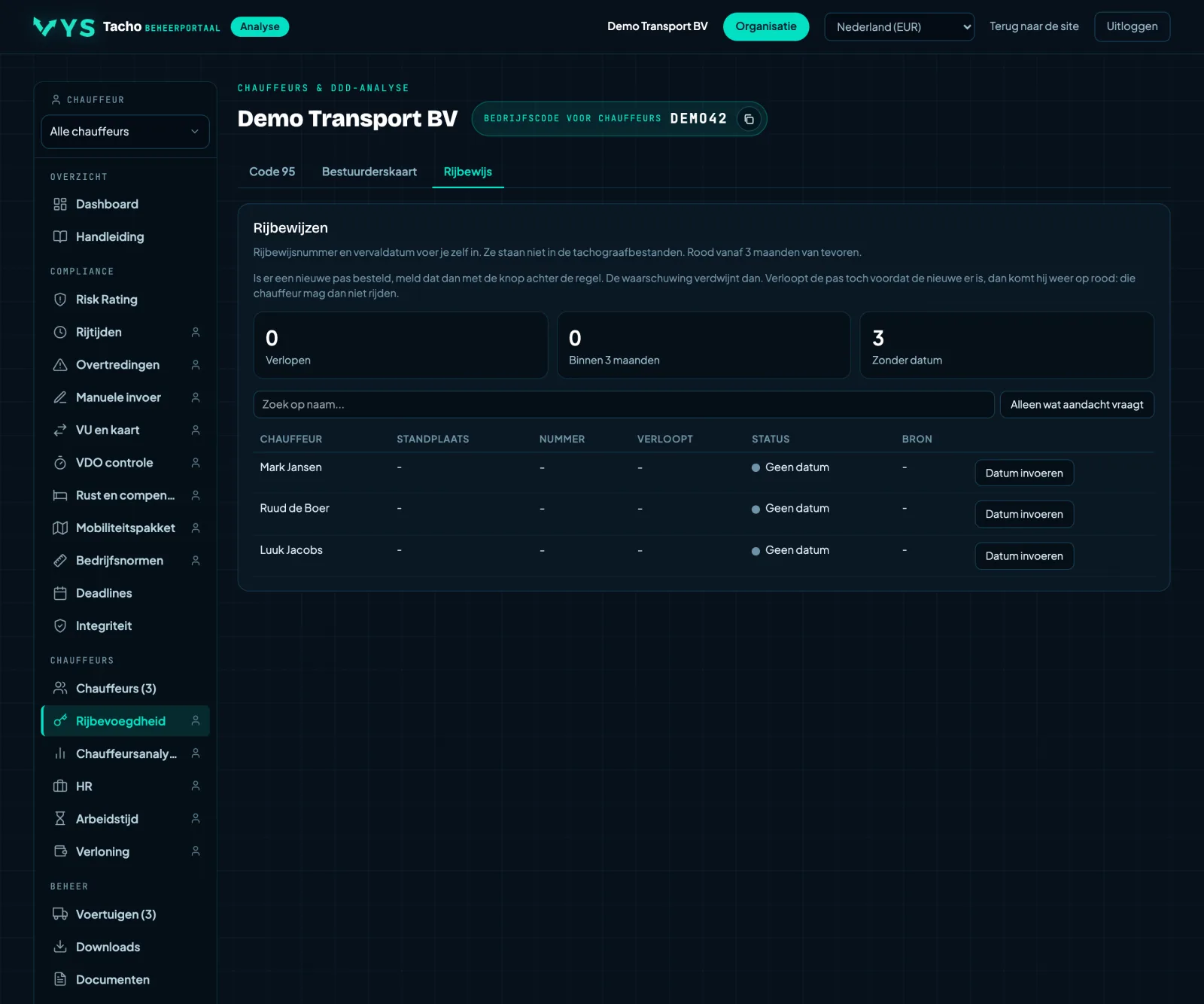
Every driver's driving licence monitored
Per driver the driving licence number and the expiry date, with a warning before it expires. A driving licence is not in the tachograph files, so you enter this data yourself.
- Enter number and date with the button next to the driver.
- With a button at the top you show only what needs attention.
- If a new driving licence has been applied for, you report it; the warning disappears until the licence actually expires.
If you fill in nothing, the portal knows nothing about it and there is no warning either: an empty row here is not an approval but a gap.
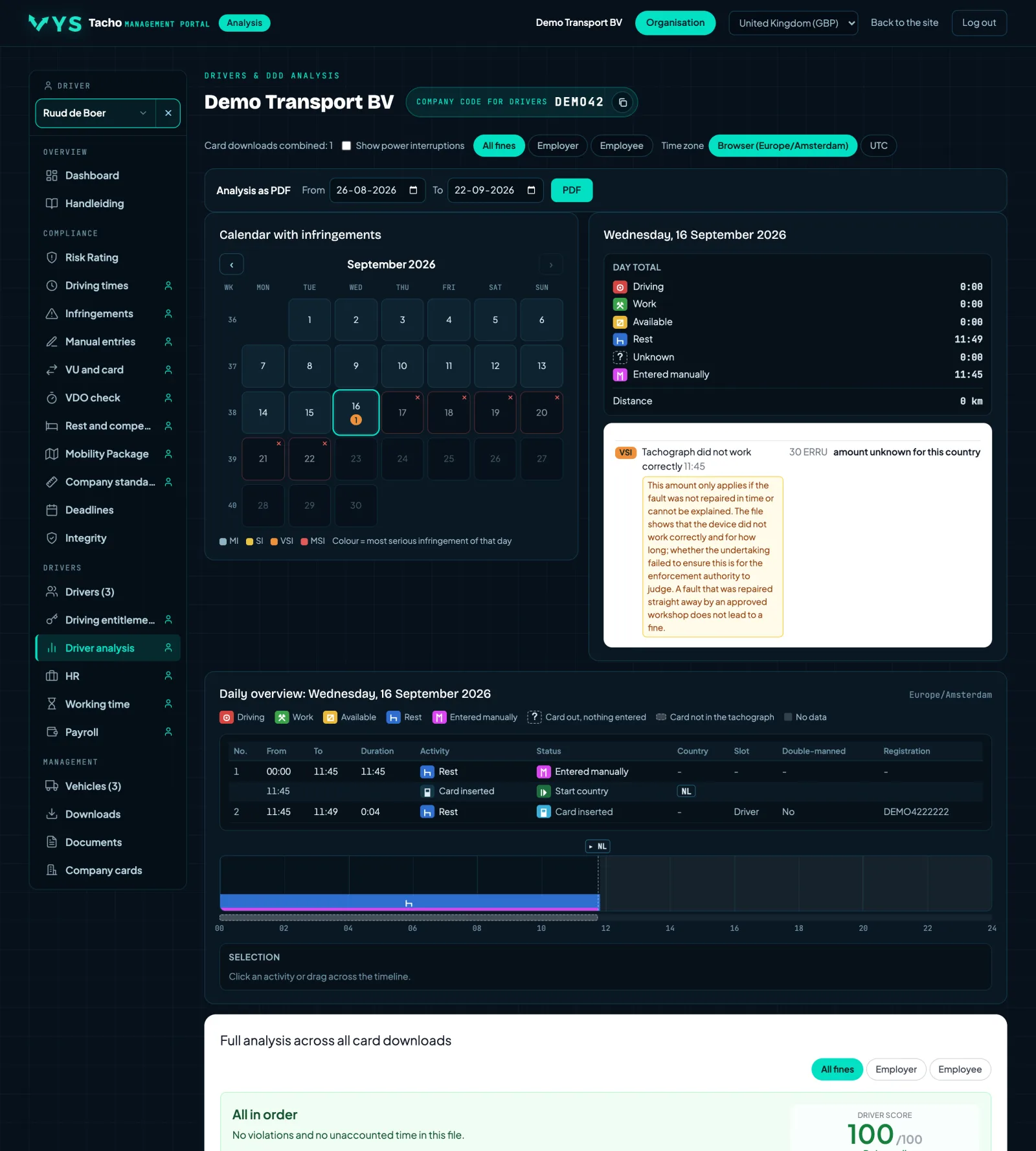
The full analysis per driver
A calendar with the most serious infringement per day, a timeline with driving, work, availability, rest and manual entry, and the full analysis across all card downloads. Not per file, but as one continuous picture.
- Click on a day for that day's timeline, as an inspector sees it.
- The unaccounted time is made visible: the stretch for which nobody can show what happened.
- Country borders and the places where things went wrong, included.
- Every infringement shown as a police cap on the timeline at the moment it was committed; a click gives the explanation: what happened, the fine, the ERRU points and who the fine is for.
- Above the bar, the start countries and end countries, positions with a link to Google Maps, border crossings, loading and unloading and the registration number, each with a line to the moment on the bar.
- Click on the month above the calendar to go straight to another month or day.
- Can be exported as a PDF for the file.
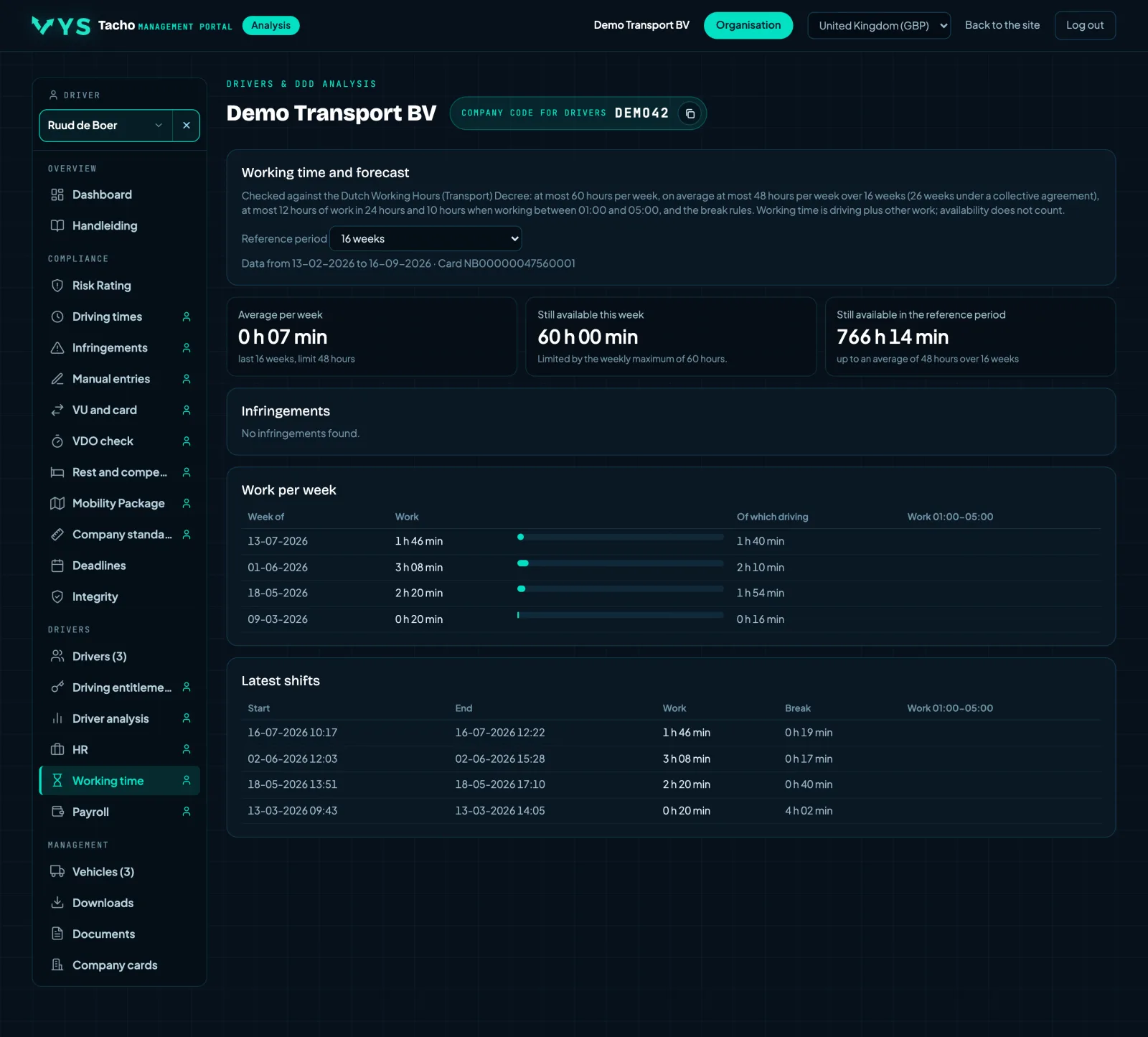
Working time, and that is a different law
The driving time regulation is about driving and resting, the Dutch Working Hours Decree for Transport (Arbeidstijdenbesluit vervoer) is about working. The portal checks separately against the latter: at most sixty hours per week, an average of forty-eight over sixteen or twenty-six weeks, twelve hours per twenty-four hours and ten with night work.
- The average over the reference period, because that is what is checked.
- A forecast showing whether someone is on course to go over the limit.
- What is still left this week before the limit is reached.
Night work has its own, stricter limit. A week that is just within the normal standard can still be too long under the night standard.
The driver card as an inspector sees it
A driver's card file as a tree: the chip, and per generation every part of the card with its own data. A card with a first and a second generation stores two separate sets, and you see them side by side here.
- Places, vehicles, events, faults, activities, border crossings and loading and unloading, each as a separate part.
- The field names from the regulation, so you can compare it with another program or an inspector's printout.
- Every card file of the driver can be selected; the newest is open by default.
All driver cards in a row
A tab under Card overview. Every driver card the company knows, including those that only appeared in a vehicle unit: with the driver, the card number, the generation, the issuing country and the expiry date.
- Generation 1, 2 or 2 version 2 (smart tachograph 2) from the card itself, or from the vehicle unit if the card has never been downloaded.
- The last download and the number of downloads, in orange if it is older than 28 days.
- Search, sort and filter on cards that expire within 60 days or have never been downloaded.
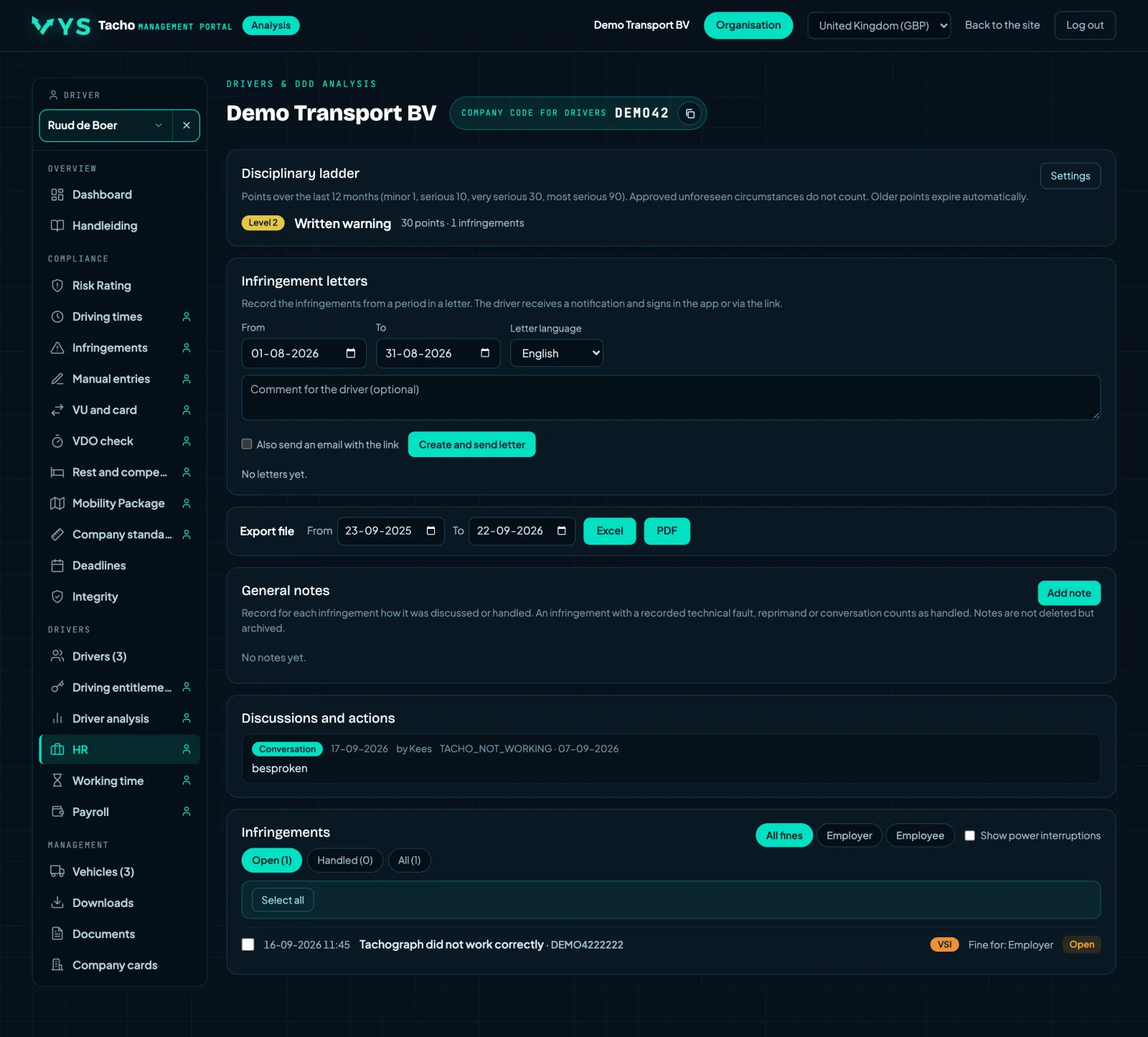
From infringement to conversation, and to the file
A disciplinary ladder based on the ERRU points, infringement letters that the driver receives in his own language and signs in the app, notes and discussions per infringement, and a file to export.
- The letter in the driver's language, with the infringement and the article in it.
- Signing is done in the app; the signature comes back into the file.
- Export to Excel or PDF over a period of your choice, for a performance review or a file in case of repeat offences.
A driver record per driver
Personal details, address and contact details of every driver in one place, with his card, the app and which analyses and emails he has received and read. In the overview you see per driver how complete his driver record is.
- Per driver what has been filled in and what is still missing.
- Whether the analyses in the app have been read, and which emails have been sent, delivered and read.
Follow-up: does the driver read his analysis?
Per driver the infringements in a selected period, next to what he did to learn from them: how often he opened the driver app, how long he spent in the app and in his analysis, how long he scrolled through the analysis, whether he opened the simulator and whether he viewed the examples that go with his infringements. This is how you show that you have instructed and trained the driver.
- Choose the period; by default the last 90 days.
- Click on a driver for his infringements by type, with those that have an example in the simulator.
- How often the app was opened is shown for the period and in total, so you can also see who never looks.
Usage has been measured since 28-09-2026 and is kept permanently; there is nothing from before that. An example in the simulator currently only exists for manual entry and country codes.
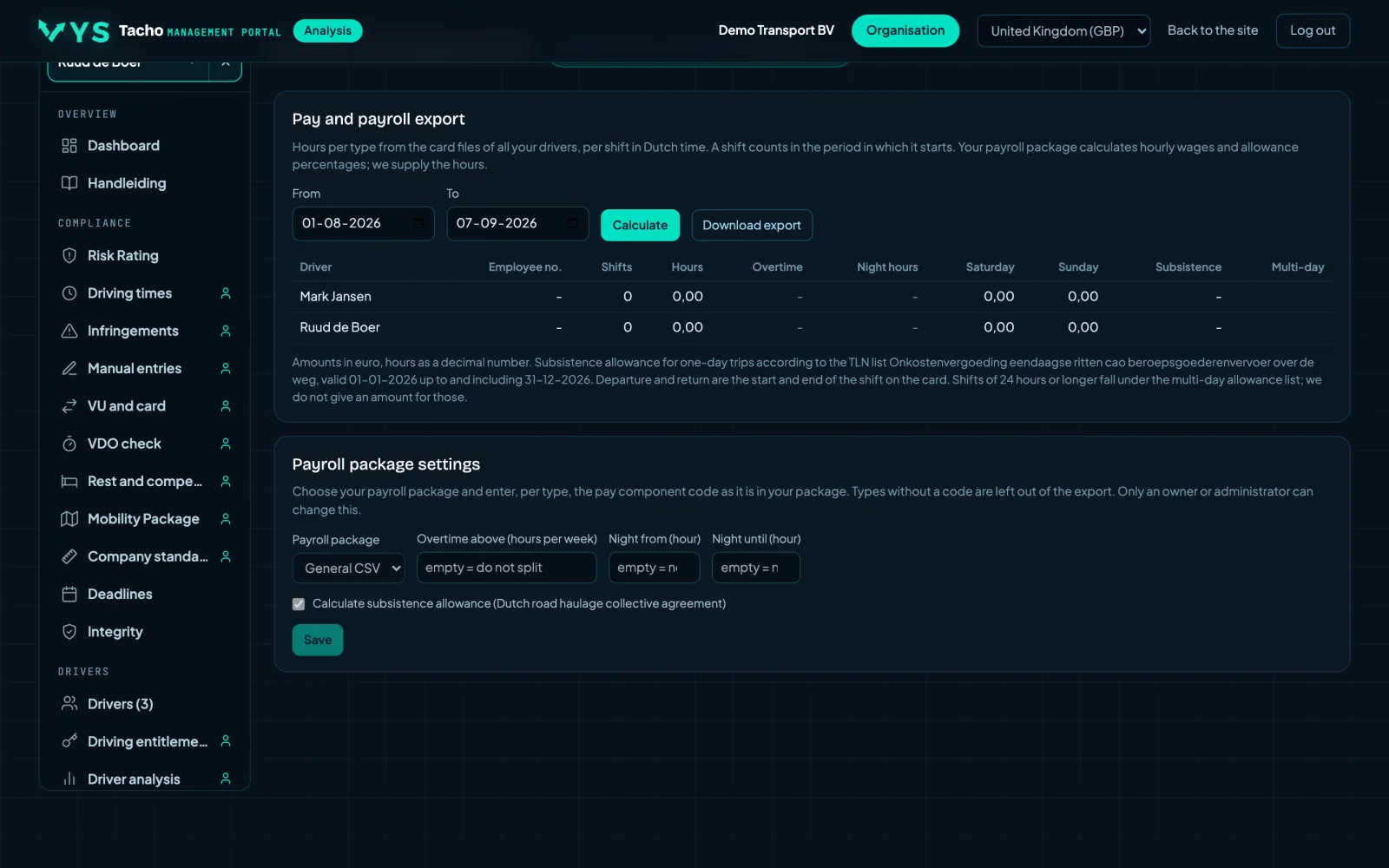
Hours to the payroll administration
The hours by type for all drivers, the driving report per day and per week, and the CAO subsistence allowances (collective labour agreement) for one-day trips. With an export for Loket.nl, Nmbrs, AFAS Profit or a generic CSV.
- Hours by type, per driver, over a selected period.
- Subsistence allowances for one-day trips according to the CAO.
- An export that you import directly into your payroll software.
The hours come from the tachograph. That is what was recorded, not what was agreed: allowances and corrections remain the work of the payroll administration.
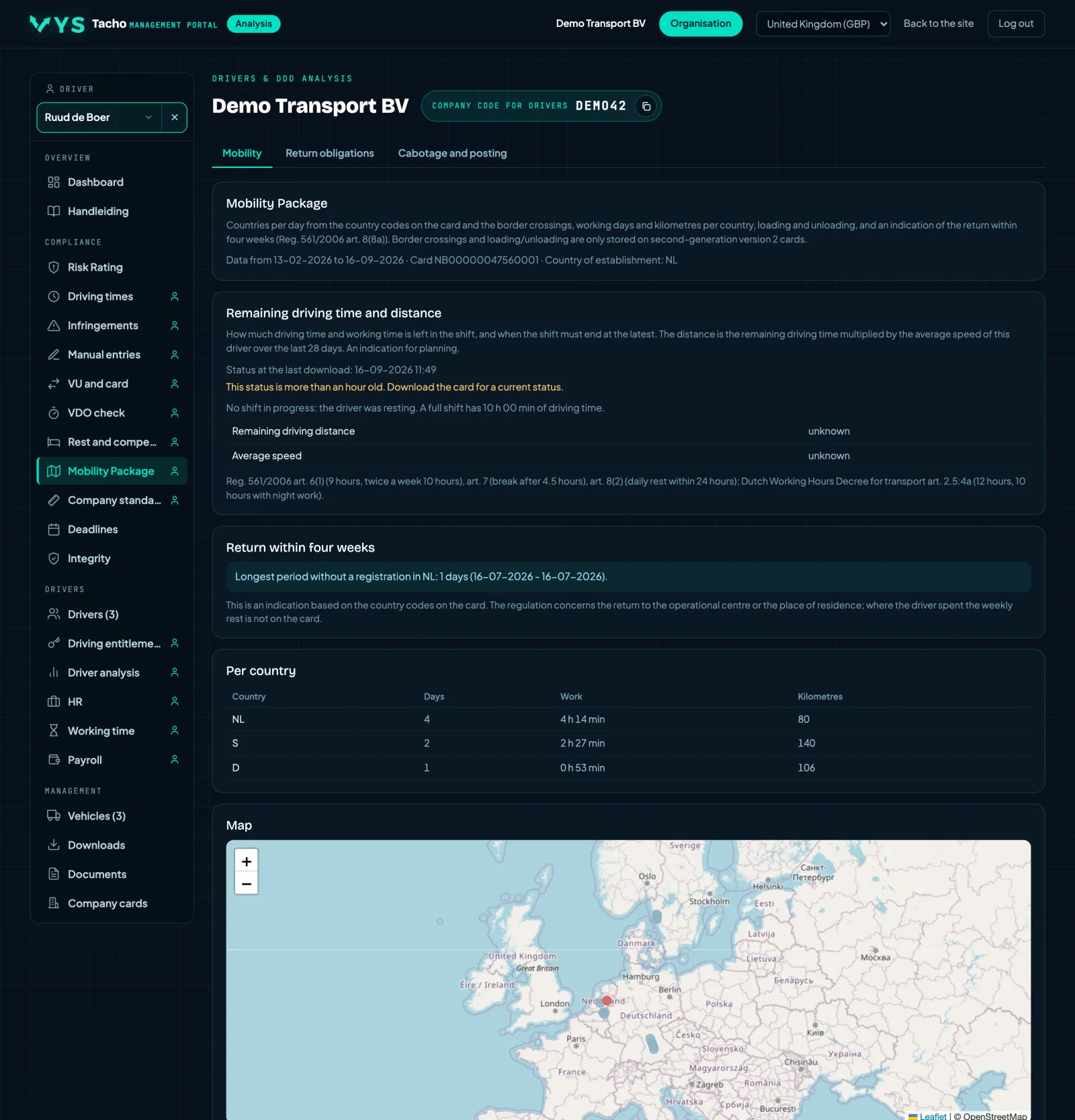
Where has the driver been
Per driver the countries per day, the border crossings and the loading and unloading places on the map, with an indication for the return obligation. The basis for every question about cabotage, posting and the return to the country of establishment.
- Countries per day and border crossings, from the tachograph files.
- Loading and unloading places on the map.
- A return indication, as a stepping stone to the Return obligations page.
What is missing, and therefore cannot be seen anywhere else
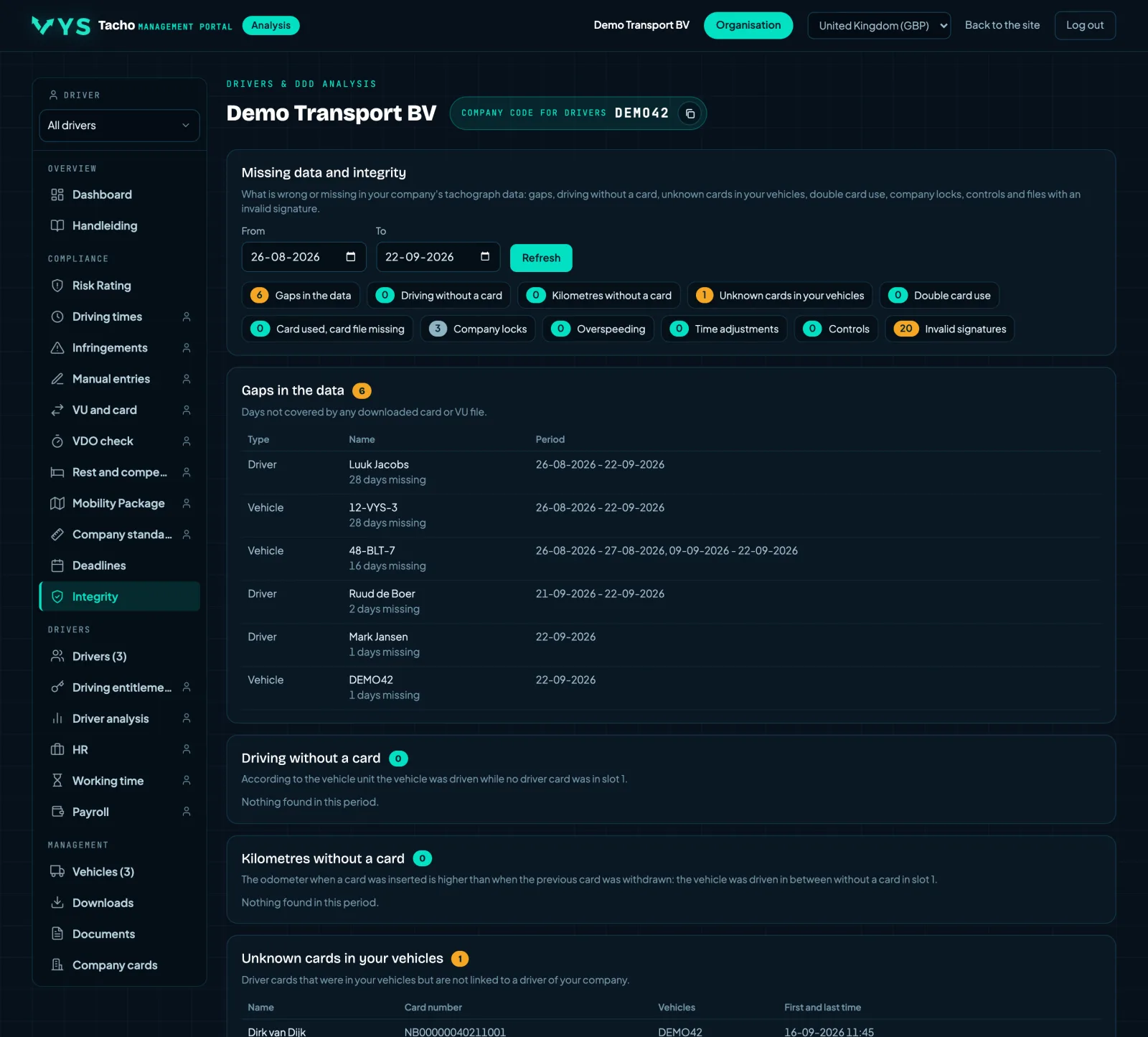
The counterpart of all the other pages. This is where the portal shows what it can say NOTHING about: periods for which nothing was downloaded, kilometres driven without a card, unknown cards in your vehicles, double card use, time adjustments and invalid signatures.
- Gaps in the data, with the question: not downloaded or not driven.
- Driving and kilometres without a card, always worth a conversation.
- Company locks, overspeeding, controls and signatures that do not add up.
An empty overview elsewhere does not mean everything is in order. If nothing was downloaded for a period, there is nothing to see for that period either. This page shows exactly that.
Which downloads are incomplete, per vehicle and per driver
A tab under Integrity. Per vehicle and per driver the last download, and over the past 56 and 90 days how many files came in and how many of them are incomplete, have a signature that does not check out, or cannot be verified. That way you see at once where downloading goes wrong.
- What needs attention is at the top: first incomplete downloads, then who has nothing in 90 days.
- For each file the reason why it is not in order, and a button to download it.
- Cards without a driver and files without a vehicle are shown separately, because they do not count anywhere.
An incomplete file does not count anywhere: the analyses skip it. Download that card or that vehicle again.
The signatures and certificates of every file
A tab under Integrity. For each file, the digital signatures of the vehicle unit and the driver card, recalculated: the certificate chain from the European root key via the member state to the vehicle unit or card, with validity and algorithm, and for each part whether the signature is correct.
- For a vehicle unit every block and every activity day separately, for a card every EF, for G1 and G2.
- Expandable per file, with a filter for deviations only.
- The identification included: card number and expiry date, or VIN, registration number and serial number of the vehicle unit.
A file with a signature that does not check out does not count as a valid download during a check. Download that card or that vehicle again.
Download deadlines, cards, calibration and documents
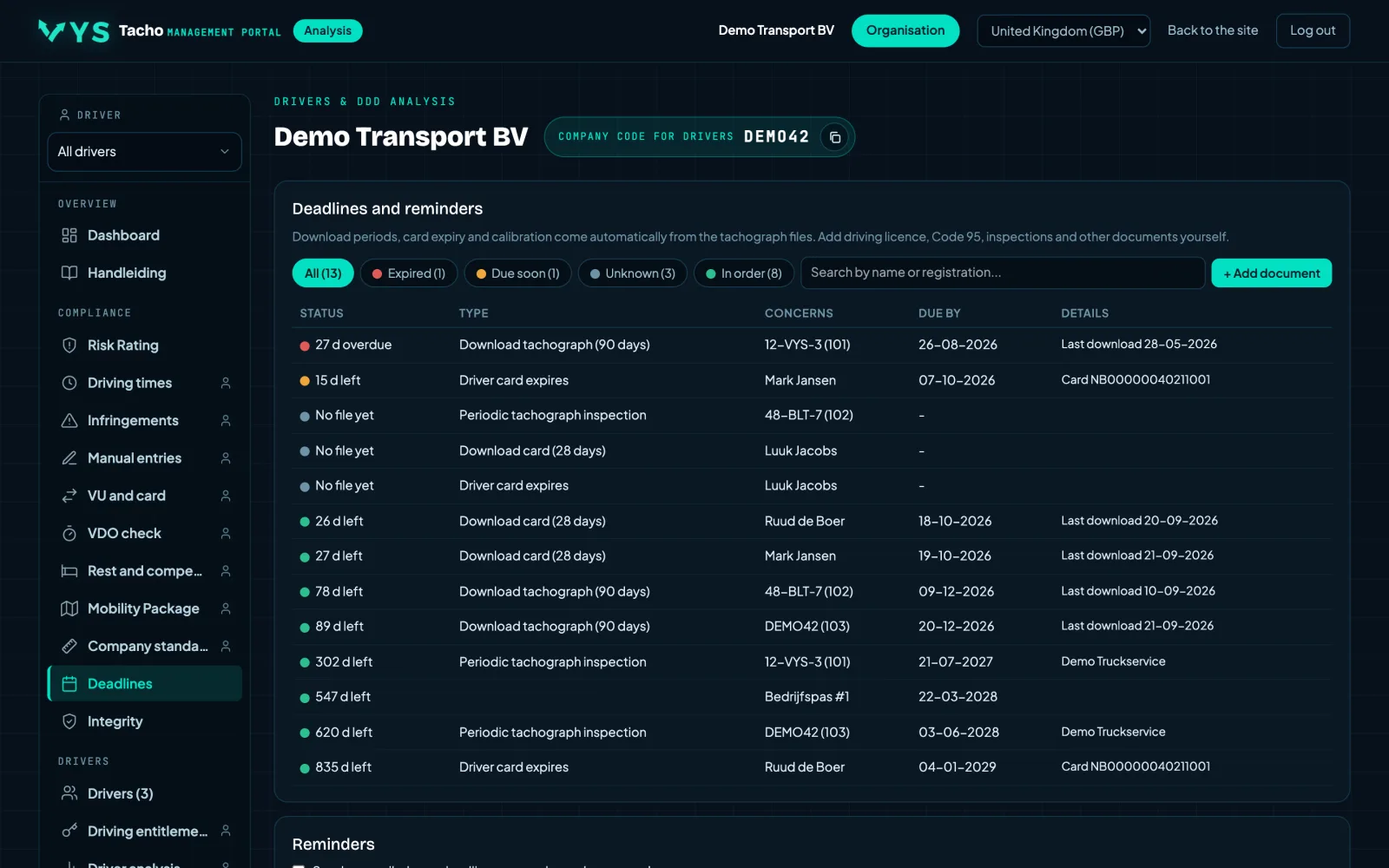
The twenty-eight days for the card and the ninety days for the vehicle come automatically from the files, as do card expiry and the periodic inspection of the tachograph. Driving licence, Driver CPC, ADR and other documents you add yourself, with email reminders and a notification to the driver.
- Download deadline per card and per vehicle, calculated from the last successful download.
- Card expiry date, card generation and the two-yearly calibration.
- Your own documents with your own deadlines, entered once and then monitored.
A download that was interrupted halfway does not count, even if the file is in the list. For Driver CPC only the expiry date is shown here; whether the thirty-five hours are on schedule you see on the CPC tab.
The company card at the office and the app in the cab
The status of the company card in the card reader at the office, and which drivers use the app and when they were last connected to the tachograph. Plus Live: the latest reading per vehicle and per driver, with activity, speed and the tachograph's counters.
- Check that the company card is in the reader before you start a remote vehicle download.
- See who is supplying fresh data and who has not been connected for days.
- Live shows what is happening now; the driving times page shows what happened over a day or week.
Without a company card in the reader, a remote vehicle download cannot start. That is not a fault in the portal but a requirement of the tachograph.
What is happening now, per vehicle and per driver
The latest reading as the app in the cab passes it on: the activity, the speed and the tachograph's counters. Where the Driving times page shows what happened over a day or week, Live shows what is happening right now.
- Activity and speed per vehicle and per driver.
- The counters of the tachograph itself, such as the remaining driving time.
- Handy for planning without having to call the driver.
This data only comes in when the app in the cab is connected to the tachograph. No reading means no connection, not that the vehicle is standing still.
Vehicles, and what the vehicle unit itself recorded
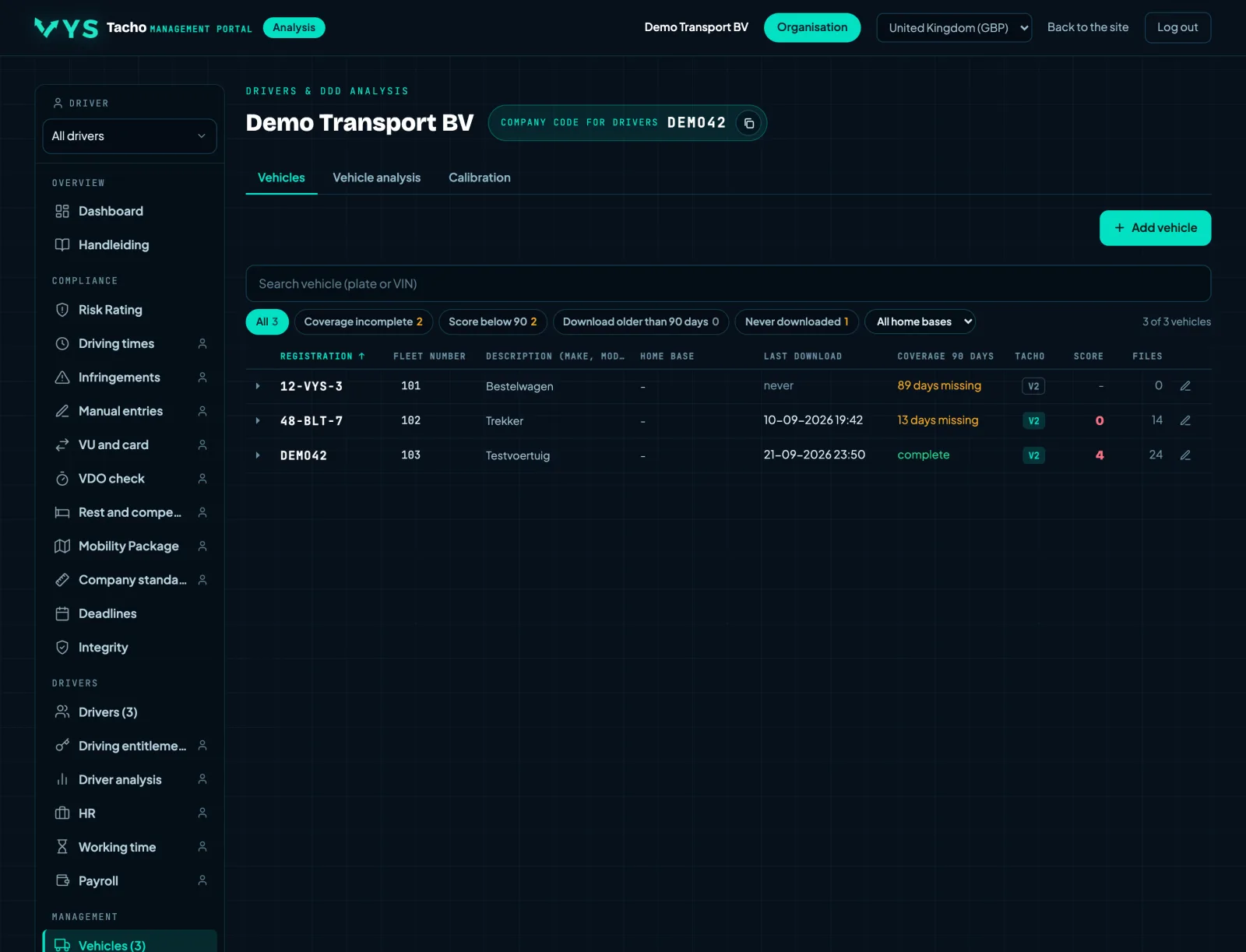
Your company's vehicles with registration number, fleet number, the tachograph fitted and the last VU download. Per vehicle the infringements from the vehicle unit, such as driving without a card, and a vehicle analysis with timelines per day and who was driving.
- Search by registration number and filter on vehicles with alerts.
- An analysis per vehicle, across drivers.
- The files you need for a check of that vehicle.
Cross check: hire vehicles and hired staff separately
A hire vehicle or a hired driver is only with you temporarily, but their infringements do count. The Cross check lists them separately, with their files, the last download, the score and a direct route to their analysis. You add a hire vehicle with its registration number, or you upload the VU file and the portal extracts the registration number and chassis number itself.
- A temporary tick for each vehicle, and a hired tick for each driver.
- Add a hire vehicle by hand or from the VU, analysed straight away.
- The 10 vehicles and drivers that came in most recently, for checking.
Who drove when, across the whole fleet
Which driver was in which vehicle, with card insertion, withdrawal, slot and kilometres. From the card sessions in the VU files and the vehicle usage on the cards combined, so also a driver who does not belong to the company and a vehicle for which there is no VU file.
- Search by period, by vehicle or by driver.
- For each row the source: VU, card or both.
- One click to the vehicle or driver analysis.
The vehicle unit as an inspector sees it
A VU file as a tree: the overview with company locks and downloads, the activities per day, faults and events, the detailed speed and the technical data with calibrations and the paired sensor.
- Every part of the file separately, with the field names from the regulation.
- Every VU file of the vehicle can be selected; the newest is open by default.
What happened to a vehicle, across drivers
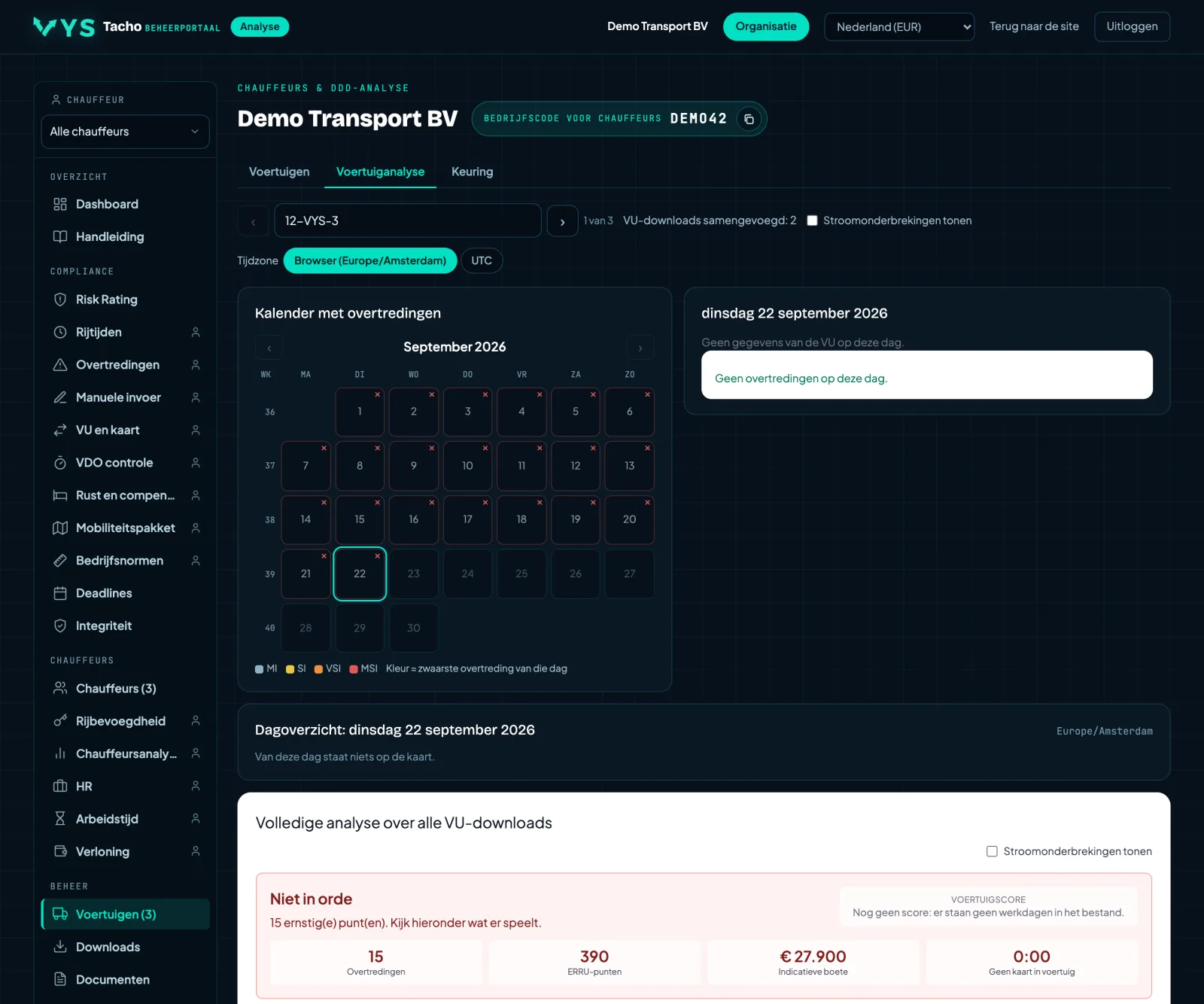
The same structure as the driver analysis, but per vehicle: timelines per day from the vehicle unit, with who was driving. That way you see what happened to a vehicle, regardless of which driver was in it.
- Timelines per day from the vehicle unit file.
- Per day you can see which driver was driving.
- Handy for a question about a vehicle rather than about a person.
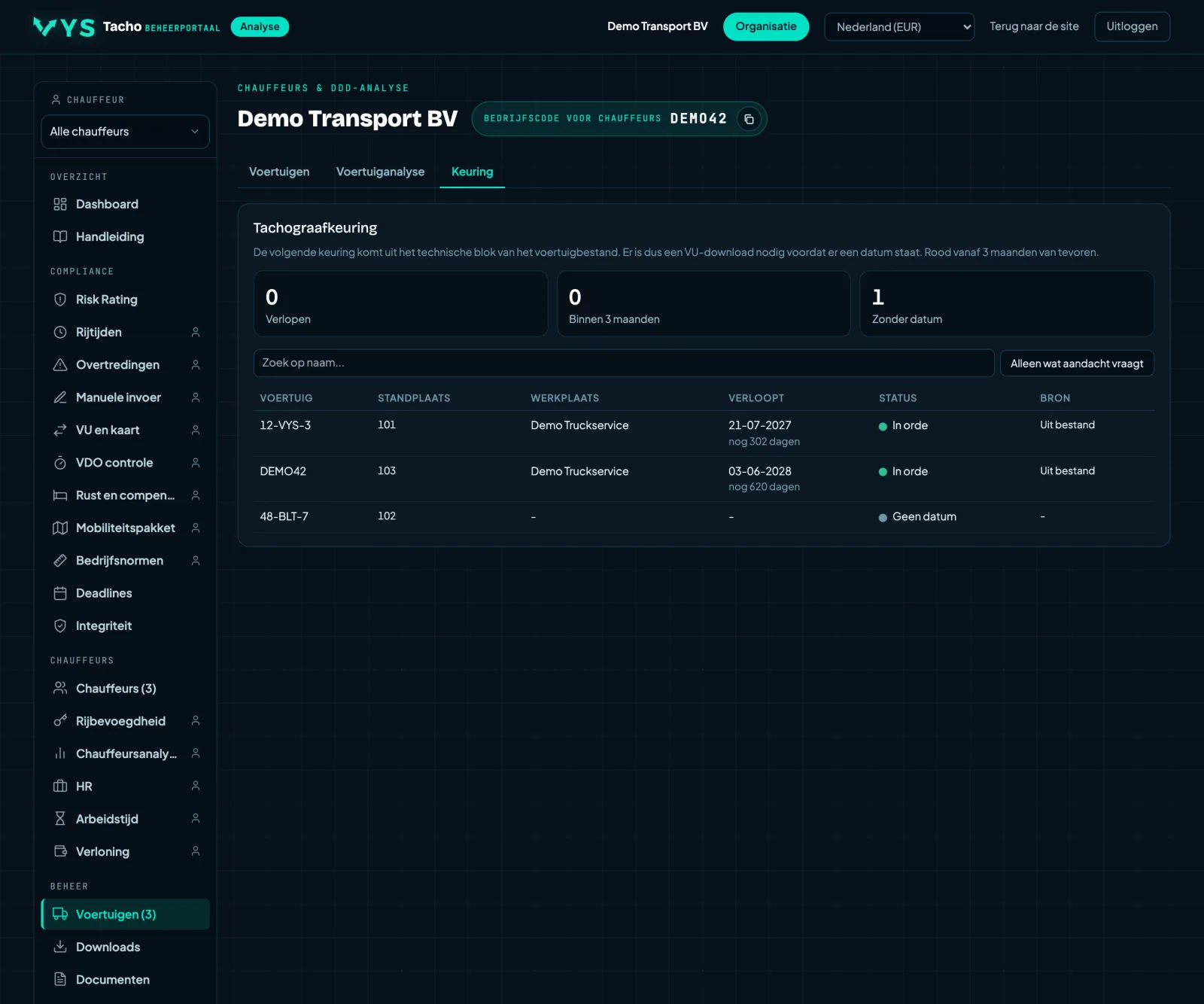
When each vehicle needs to be calibrated again
Per vehicle the date of the next tachograph inspection, with the registration number, the base location and the workshop that carried out the previous inspection. The date comes from the technical block of the vehicle file.
- The next inspection is at the top, with anything already overdue above it.
- Registration numbers for which there is a file but no vehicle has been created yet are also included. That is exactly where an inspection gets forgotten.
- A download of the vehicle unit is needed before a date appears.
The first time you open this tab, the vehicle files are read, and that takes time. After that it comes from a cache and is instant.
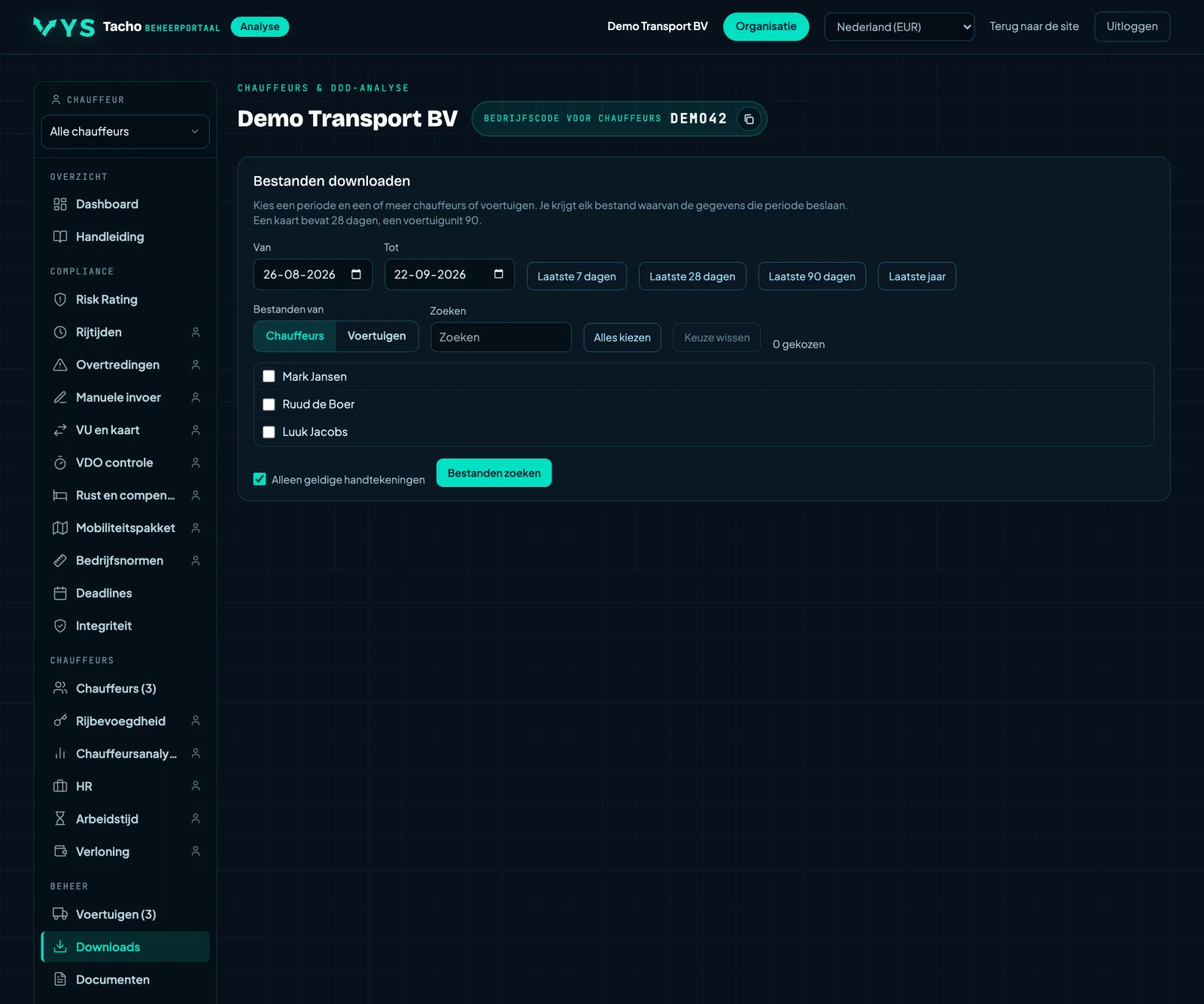
All files, retrievable in one go
All retrieved tachograph files in one place. Choose a period and drivers or vehicles, and retrieve everything from one driver, one vehicle or a whole group in one go. Handy when an inspector asks for the original files.
- Choose a period and select drivers or vehicles.
- Download everything from a whole group in one go.
- The original files, ready for a check.
- Choose the format: DDD, or for France .C1B and .V1B and for Spain .TGD, with the file name that the regulations of that country prescribe.
What you get here are the original files as they came out of the tachograph, with their signature. Do not edit them: the signature can then no longer be verified and the file is worthless as evidence.
The last thirty downloads, one below the other
A tab under Downloads. The last thirty downloads of vehicle units and driver cards, newest at the top, with vehicle or driver, the period the file covers, the size and whether the signature is correct. That way you see at a glance whether anything has been downloaded today.
- Vehicle units and driver cards in one list.
- For each file a button to download it.
- An invalid signature stands out immediately.
The original files, and the paperwork that makes it provable
The original DDD files as a zip for a check, with the signature status of each file. Excel reports, reports sent automatically by email, and the oversight statement, which has been under BeMaMiToe since 30-09-2026. The attestation of activities has its own tab.
- Download everything from one driver, one vehicle or a whole group over a selected period in one go.
- The oversight statement records THAT you have carried out checks, with the figures for that period. Article 10(2) obliges you to check regularly; this is the paperwork you use to prove it.
What you get are the original files as they came out of the tachograph, with their signature. Do not edit them: the signature can then no longer be verified and the file is worthless as evidence.
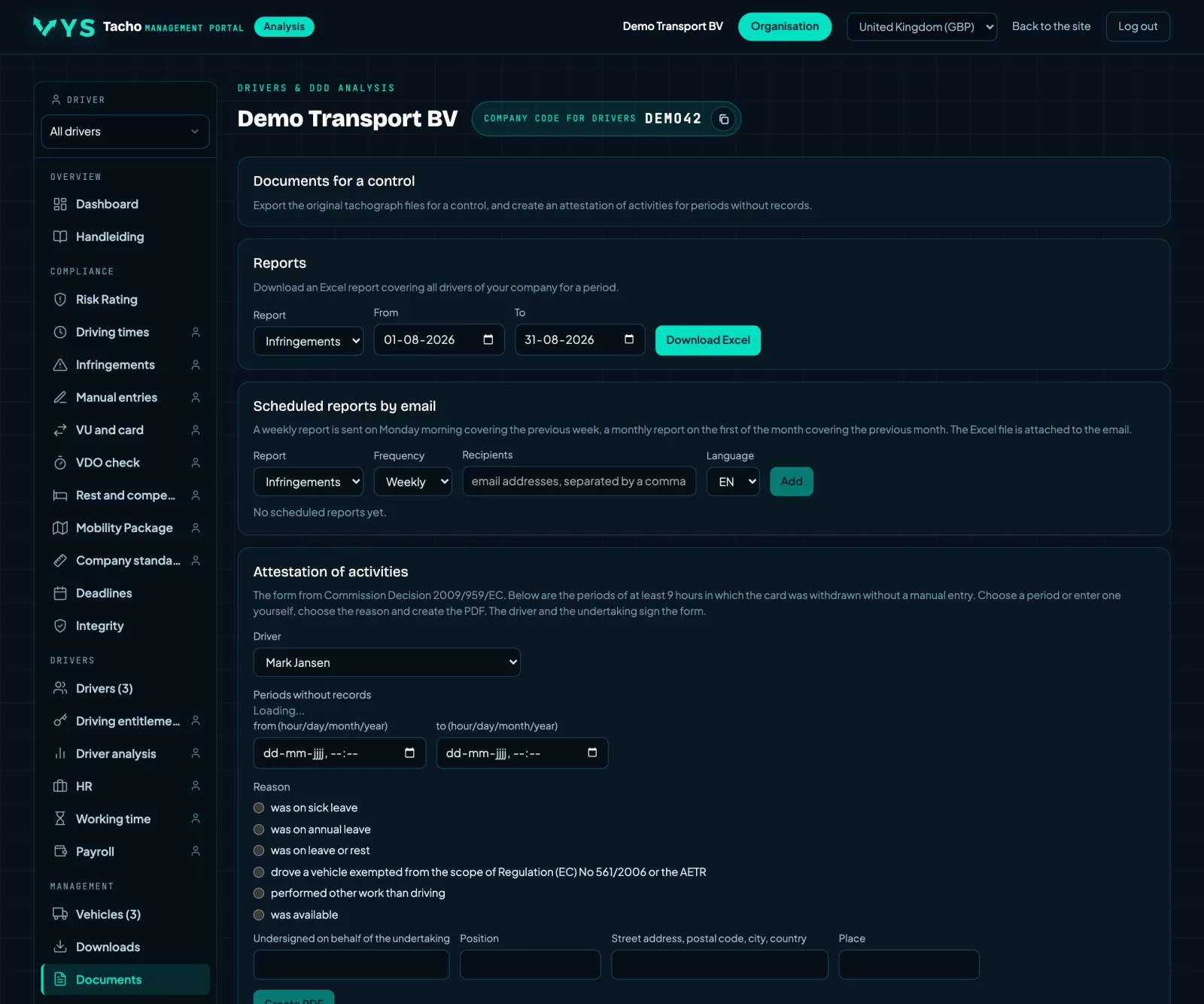
The attestation of activities, filled in and ready to sign
A tab under Documents. The official form from Decision 2009/959/EU in 23 languages, pre-filled with the details of the company, the driver and his driver card. Choose the period without recording and the reason, check the preview and print the PDF to have it signed.
- The periods in which the card was out without a manual entry are ready to choose.
- Date of birth and driving licence number come from the driver card, the address from the depot.
- The text of the form is the official text in the selected language.
A member state may not make this form mandatory (Regulation 165/2014). It is recommended to accept it if nothing could be recorded on the tachograph for technical reasons.
Reports as PDF, to print or email
Create a report on a driver, a vehicle or the whole company. Choose the period and the sections, such as infringements, coverage, integrity, validity and signatures, and view, print, download or email the PDF.
- Three types: per driver, per vehicle and a management report on the whole company.
- Choose for yourself which sections are included.
- Print directly, save as PDF or email as an attachment to one or more addresses.
The report comes from the same files as the pages of the portal. What is missing there because nothing was downloaded is also missing from the report.
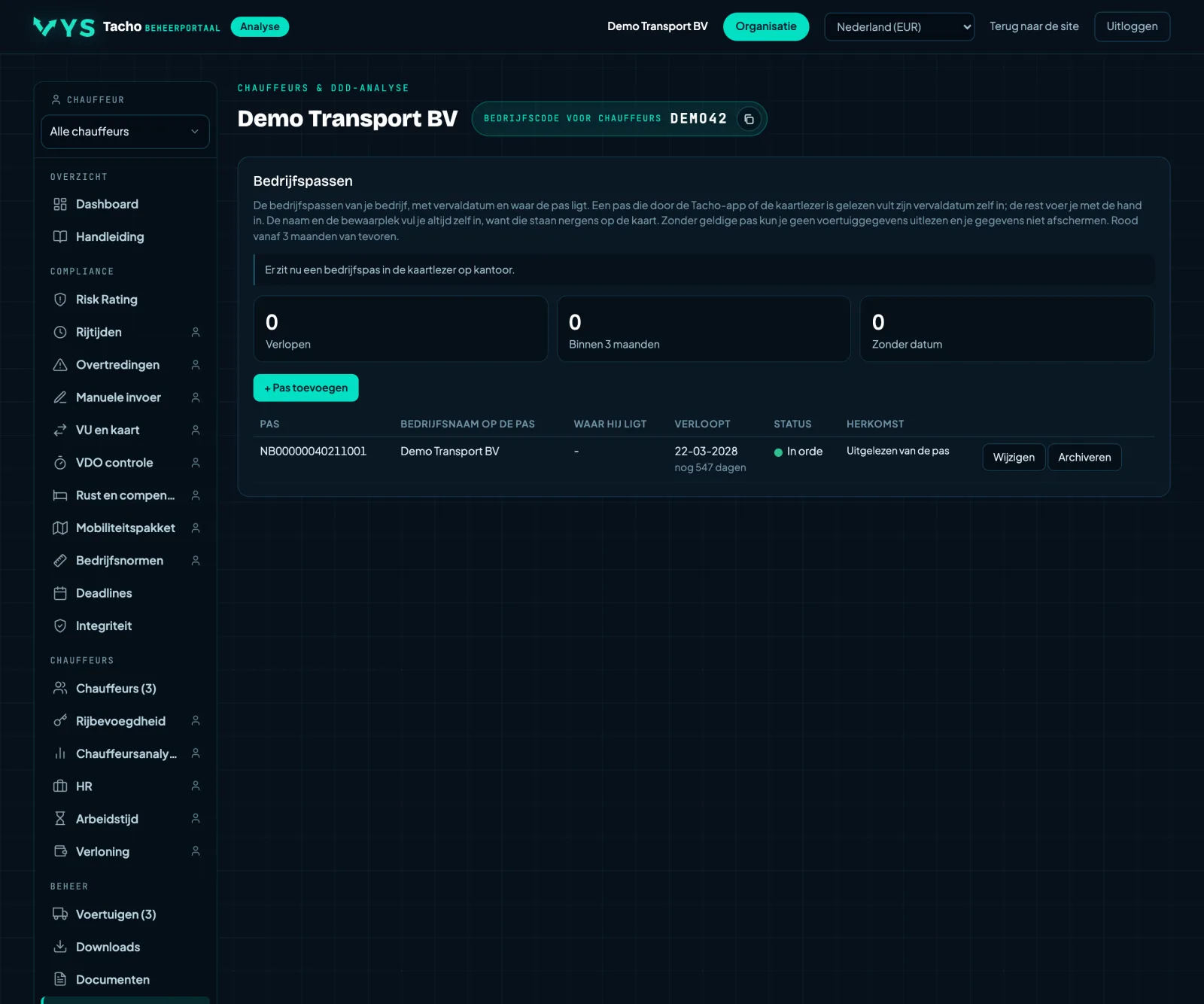
Your company cards, their expiry date and where they are kept
All your company's company cards with their expiry date and storage location. A card that has been read by the Tacho app or by the card reader at the office appears automatically, with the expiry date and the company name from the card itself.
- A card that has been read appears automatically; its expiry date comes from the card.
- You add a card that is not in any reader yourself, with a name and the expiry date.
- You fill in the storage location yourself: safe, card reader at the office or card hotel.
- At the top you can see whether there is a company card in the card reader at this moment.
- You archive a card you no longer have; it is kept but no longer counts.
Without a valid company card you cannot read vehicle data or lock your data.
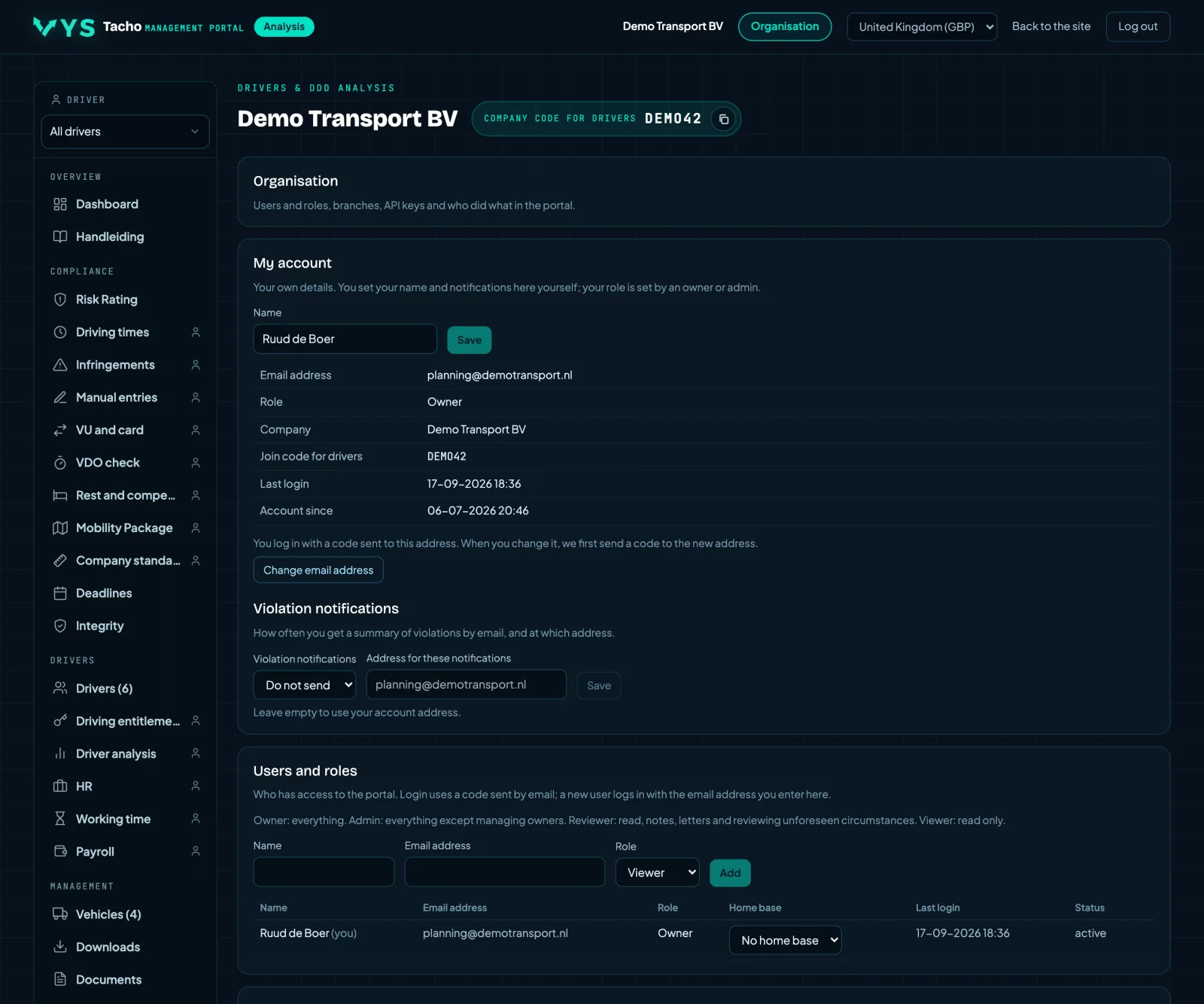
Roles, depots, exemptions and retention period
You add users yourself with a role: owner, administrator, reviewer or viewer. Logging in is done with a code sent by email, without a password. Everything that happens is recorded in the audit log. Plus depots, API keys, the Article 13 exemptions and your own retention policy.
- Menu items you do not use can be switched off for the whole company; the order stays personal.
- Record the Article 13 exemptions, with the reason. That is something different from Article 12, which concerns a one-off unforeseen deviation.
- Set a retention period; the portal calculates what is too old according to your policy, and you do the deleting yourself.
- Receive files by email via ddd@vystacho.nl from known addresses.
- The number of certified true copies of your Community licence, for the threshold of the ILT penalty points.
- API keys that let another system only read the data, with the last time the key was used.
Hiding a section is not security: anyone who knows the address can still get to it and sees a note there that it is not in the menu. If you want someone to really not be able to see something, give them a role that does not allow it.
72 features, in 7 sections
This is also how the menu appears in the portal itself. Whatever you do not use you switch off; everyone drags the order to suit their own preference.
Overview
- Dashboard
- Fine indication, ERRU points and scores of the whole company over a period.
- Attention
- The past and coming week: notable drivers, expired deadlines and notable events.
- Risk Rating
- Risk classification with trend, twelve-month outlook and per depot.
- ILT penalty points
- The ILT penalty points against the threshold of your licence, with trend and outlook.
- Introduction
- What the portal analyses and how, where to find everything, and how you demonstrably comply with BeMaMiToe using the portal and app: orders, measures, means and supervision.
- Manual
- A complete manual and a guided tour in the portal itself.
- Knowledge base
- The knowledge base of the simulator in the portal: driving and rest times, the tachograph and national legislation, with the legal text per topic.
- Fine tables
- What an infringement costs per country, side by side per type of infringement.
Compliance
- Infringements
- By type and per driver, with class, points and fine indication.
- Inspection report
- Per driver and per vehicle what the inspection looks at, with what comes out of the files for it: infringements, fraud indicators, calibration and events.
- BeMaMiToe
- Step by step what needs to be in order per company, per driver, per vehicle and during a (digital) inspection, with for each step where you arrange it in the portal.
- BeMaMiToe per driver
- Per driver which steps have demonstrably been taken: instruction signed, letter signed, examples viewed, analysis read, every infringement followed up, the disciplinary ladder, unforeseen circumstances assessed, card downloaded on time, app, card, driving licence, Driver CPC and the signed oversight statement.
- BeMaMiToe per vehicle
- Per vehicle whether the vehicle unit was downloaded on time and kept complete for a year, the calibration, your own company lock, the roadworthiness test (APK), driving without a card and the signed oversight statement, with a button to the page where you arrange it.
- Instruction
- The written instruction for your drivers, from a template that follows the legal text, with versions; every driver signs it with his signature via a link: the proof for the B of BeMaMiToe.
- Oversight statement
- The statement that you carried out checks over a period, with what you found and what you did, signed in the portal and stored with your signature: the proof for the T of BeMaMiToe.
- Manual entries
- A score per driver, with per day what was missing.
- Double crew
- Card changes during double-crew driving where the card was not set to work before or after.
- Border crossings
- Border crossings from the vehicle unit that are not on the card.
- Country codes
- Work periods for which the start or end country is missing on the card and in the vehicle unit.
- VU and card
- The vehicle unit next to the driver card, with the deviations.
- VDO check
- Drivers who drive off too soon and lose their entry as a result.
- OUT
- Who used OUT when, and how much was driven under OUT.
- Ferry/train
- Who used ferry/train when, with the verdict according to Art. 9 and the start and end country around the crossing.
- Loading and unloading
- Every loading and unloading operation from the card and vehicle unit, with the GPS position on Google Maps.
- Return obligations
- Driver every four weeks, vehicle every eight weeks.
- Cabotage and posting
- Journey type per country, cabotage signals and posting countries.
- Integrity
- Gaps, driving without a card, unknown cards and signatures.
- Download check
- Per vehicle and driver the incomplete downloads over 56 and 90 days.
- Signatures
- For each file the certificates and every signature of VU and card, recalculated.
- Deadlines
- Download deadlines, cards, calibration and your own documents.
Planning
- Driving times
- Driving, work and breaks today and this week, with the remaining driving time.
- Rest and compensation
- Outstanding compensation hours with the deadline.
- Payroll
- Hours by type, subsistence allowances and export to the payroll software.
Drivers
- Drivers
- The list with score, points, card data and trend. On request created automatically from your HR system.
- Driver analysis
- Calendar, timelines and the full analysis across all downloads.
- Double crew per driver
- When the driver drove with two people, in which slot, in which vehicle and with whom.
- Vehicle check
- Per departure: how long the driver waited after inserting the card, whether he set the tacho to work and whether he had already entered the check manually before inserting. With your own standard in minutes.
- Border crossings per driver
- Every border crossing by the driver in the last 12 months, with time, countries and the exact location on a map.
- Last roadside inspection per driver
- When each driver was last checked, how often in the last 12 months, and where, on a map.
- Driver CPC
- Thirty-five hours per cycle, with quarterly planning and module management.
- Driver card
- Card number and expiry date per driver, from the card files.
- Driving licence
- Driving licence number and expiry date, entered yourself and monitored.
- Card overview
- A card file as a tree: the chip and per generation every part of the card.
- All cards
- Every driver card with generation, country, expiry date and last download.
- Working time
- Checked against the Dutch Working Hours Decree for Transport, with forecast.
- Shifts
- Per shift the start, the end, from when the next shift was allowed to start, when it actually started and whether the daily rest was correct.
- HR file
- Disciplinary ladder, infringement letters, notes and export.
- Driver records
- Personal details, address and contact details of every driver, with what is still missing.
- Follow-up
- Per driver the infringements in a period and what he did to learn from them: the app, the analysis, the simulator and the examples for his infringements.
- Mobility
- Countries per day, border crossings and loading and unloading places on the map.
Tacho
- Tacho app
- The company card in the reader and which drivers are connected.
- Live
- The latest reading per vehicle: activity, speed and counters.
Vehicles
- Vehicles
- Registration number, tachograph, last download and alerts.
- Cross check
- Hire vehicles and hired staff separately with their analyses, add a hire vehicle by hand or from the VU, and the most recently added vehicles and drivers.
- Who drove when
- Which driver was in which vehicle, from the VU files and the card files combined, per period, vehicle or driver.
- Vehicle analysis
- Timelines per day from the vehicle unit, with who was driving.
- VU overview
- A VU file as a tree: overview, activities, faults, speed and technical data.
- Software versions
- The software on every tachograph and which update is legally required, according to the European Commission's list; and which vehicle still needs a smart tachograph version 2 for international transport.
- Tachograph calibration
- When each vehicle needs to be calibrated again, from the vehicle file.
- Border crossings per vehicle
- Every border crossing the tachograph recorded in the last 12 months, with who was driving and the exact location on a map.
- Company locks
- Per vehicle whether it is locked with your company card, by another company, or not at all; anything requiring action also appears on Attention.
- Last roadside inspection per vehicle
- When each vehicle was last checked, what the inspector did, how often in the last 12 months, and where, on a map.
Management
- Downloads
- Retrieve everything from a driver, vehicle or group over a period.
- Latest downloads
- The last thirty downloads of vehicle units and driver cards.
- Retention
- Per card and per vehicle the coverage of the stored data over the last 52 weeks, with the gaps.
- Documents
- DDD as zip and reports.
- Attestation
- The attestation of activities, filled in and ready to print and sign.
- Reports
- Reports per driver, vehicle or the whole company as PDF, to print or email.
- Company standards
- Your own limits next to the legal ones, monitored per driver.
- Company cards
- Your company cards with expiry date and where each card is kept.
- Onboarding
- Your contract, the monthly costs, the active modules, acceptance of the terms and the data processing agreement, invoice details and the direct debit mandate.
- Organisation
- Roles, depots, API keys, exemptions, retention policy and audit log.
Questions about tachograph analysis
How do the tachograph files get into the portal?
Drivers download their card automatically with the VYS Tacho app via Bluetooth, you upload files yourself in the portal, or you email them as an attachment to ddd@vystacho.nl from a known company email address. On request we also set up a link with your download provider, or an FTP or API link with your own server.
Can I try the portal first?
Yes. You get a one-week demo with the DDD files from your own tachographs and driver cards, so you can see what the portal does with your data. The demo is free of charge. Request it via the contact form.
What is BeMaMiToe, and how does the portal help with it?
If an employed driver breaks the driving and rest time rules, the employer is regarded as the offender (Article 8:1(2) of the Dutch Working Hours Decree for Transport, Arbeidstijdenbesluit vervoer). That only falls away if the employer shows that he gave the necessary orders, took the necessary measures, provided the necessary means and exercised the supervision that can reasonably be required (paragraph 3): BeMaMiToe. The portal records this per driver, from company standards and signed infringement letters to the oversight statement and whether the driver has read his analysis in the app.
Do I need an FMS box or a download key?
No. The app talks directly to the smart tachograph via Bluetooth and retrieves both the driver card and the vehicle unit. Nothing is installed in the vehicle, which also makes it suitable for ADR vehicles. The company card stays in a card reader at the office or in our card hotel.
Does it also work with files from another system?
Yes. A DDD file is a DDD file, wherever it comes from. Upload or email them and they are read, their signature is checked and they are linked to the right driver.
Can the portal be linked to our HR system?
Yes, on request. We link the portal to your HR system, so that a new driver is created automatically. That way nobody has to enter drivers twice, and the analysis and your personnel records always stay in step.
Is the driving times overview live?
The portal works with the card and vehicle files, so what you see is the status at the last download. The more often you download, the more up to date the overview. The Live tab also shows the latest reading passed on by the app in the cab.
Are the amounts in the portal real fines?
No, it is an indication based on the statutory fine amounts set by the government, per country. Where a country has no fixed amount per offence, this is stated instead of an estimated figure.
Who has access to the portal?
You add users yourself with a role: owner, administrator, reviewer or viewer. Logging in is done with a code sent by email, without a password. Everything that happens is recorded in the audit log, so give everyone their own account instead of a shared login.
Can I hide features we do not use?
Yes. Under Organisation you switch each menu item on or off depending on what you use; that applies to everyone at the company. The order of the tabs and the section they are in remain personal, because everyone drags them to suit their own preference.
In which languages is the portal available?
The portal is available in twenty-six languages. You choose infringement letters to drivers in their own language, so that a Polish or Romanian driver can read what it says.
How long are the files kept?
You decide that yourself under Organisation. The portal calculates what is too old according to your retention policy; you do the deleting yourself, with a confirmation. The original files remain in their original form, because an edited file is worthless as evidence.
Can I also download the files in the French or Spanish format?
Yes. Under Downloads you choose DDD, .C1B and .V1B for France or .TGD for Spain. The content is the same in all three; only the file name and the extension follow the rules of that country, with the country, the registration number or card number and the time of download in it.
What is the difference between the ERRU score and the ILT penalty points?
The ERRU score is the European risk classification: MI 1, SI 10, VSI 30 and MSI 90 points, divided by the number of vehicles. It determines how often and how strictly you are checked. The ILT penalty points are the Dutch system: 1, 3 and 9 points against a threshold that goes with your number of certified true copies. The Community licence does depend on those. The portal shows them separately.
Can I try it first with a file of my own?
Yes. On the Analyse DDD files page you upload a single .ddd file and immediately see the infringements and the fine indication, without an account. It runs in memory and nothing is stored.
One week free, with your own files
Request a demo and we open the portal for you for a week with the DDD files from your own tachographs and driver cards. That way you see what comes out of the files of your drivers and vehicles. The demo is free of charge.
Request a free demo